Hello Croqtile: From Zero to Running Kernel
You are about to write, compile, and run a complete Croqtile program — an element-wise addition of two small matrices. It deliberately does nothing clever: no tiling, no DMA, no fancy thread hierarchy. All of that comes later. Right now the only goal is to see the moving parts of a Croqtile program and how they connect.
The Two Parts of a Croqtile Program
Every Croqtile program has exactly two parts:
- Croqtile Function (
__co__) — the kernel logic, marked with the__co__prefix. It describes computation on shaped tensors. The compiler transpiles this into GPU-ready code. - Host Program — standard C++ that prepares data, calls the Croqtile function, and checks results.
Both parts live in a single .co file. The compiler tells them apart by the __co__ prefix.
A Complete Example: Element-Wise Addition
Here is the full program. It adds two [4, 8] matrices of 32-bit integers element by element:
__co__ s32 [4, 8] ele_add(s32 [4, 8] lhs, s32 [4, 8] rhs) {
  s32 [lhs.span] output;

  parallel {i, j} by [4, 8]
    output.at(i, j) = lhs.at(i, j) + rhs.at(i, j);

  return output;
}

int main() {
  auto lhs = croq::make_spandata<croq::s32>(4, 8);
  auto rhs = croq::make_spandata<croq::s32>(4, 8);
  lhs.fill_random(-10, 10);
  rhs.fill_random(-10, 10);

  auto res = ele_add(lhs.view(), rhs.view());

  for (int i = 0; i < 4; ++i)
    for (int j = 0; j < 8; ++j)
      croq::croq_assert(lhs[i][j] + rhs[i][j] == res[i][j],
                          "values are not equal.");

  std::cout << "Test Passed\n" << std::endl;
}
Save this as ele_add.co, compile, and run:
croqtile ele_add.co -o ele_add
./ele_add
You should see Test Passed. Now for a closer look at each part.
The Croqtile Function
This is the heart of the program. Here it is piece by piece.
Function signature.
__co__ s32 [4, 8] ele_add(s32 [4, 8] lhs, s32 [4, 8] rhs) {The __co__ prefix marks this as a Croqtile function. Unlike regular C++ functions, the signature carries full shape information: s32 [4, 8] means "a 2D tensor of shape 4 × 8 with element type s32 (signed 32-bit integer)". Both parameters and the return type follow this convention — type [shape] name. The compiler uses these shapes to verify that every indexing operation is in-bounds at compile time.
// TODO: The datatype set is not complete.
Croqtile supports these element types: s32 (signed 32-bit int), f16 (half-precision float), bf16 (brain float), f32 (single-precision float), and f8_e4m3 / f8_e5m2 (8-bit floats). For now, s32 is the simplest to reason about.
Output buffer declaration.
s32 [lhs.span] output;This allocates the output tensor. The expression lhs.span copies the full shape from lhs, so output automatically has shape [4, 8]. If you later change the input shape, the output adjusts — a pattern that makes Croqtile functions easier to generalize.
The computation.
parallel {i, j} by [4, 8]
  output.at(i, j) = lhs.at(i, j) + rhs.at(i, j);
parallel {i, j} by [4, 8] creates 4 × 8 = 32 parallel instances, one per element position. Each instance runs the body with its own (i, j) pair. The .at(i, j) accessor indexes into a tensor at position (i, j), and the addition is direct — one element, one thread.
If you have written CUDA before, you might wonder: are these instances CUDA threads? Thread blocks? The short answer is that parallel without any annotation lets the compiler decide. Under the hood, the 32 instances here become 32 CUDA threads inside a single thread block — but Croqtile deliberately hides that mapping at this level. In Chapter 3 you will learn to control the mapping explicitly with space specifiers like : block and : thread, nest multiple parallel axes to build a block-and-thread hierarchy, and map them onto warps and warpgroups. For now, treat parallel as "run all instances concurrently on the GPU" and move on.
Return.
return output;A __co__ function returns its result tensor. The return type in the signature (s32 [4, 8]) must match what you actually return. The caller on the host side receives a croq::spanned_data — an owning buffer with shape metadata that you can index into with [i][j].
The Host Program
The host is plain C++ with a few Croqtile API calls:
auto lhs = croq::make_spandata<croq::s32>(4, 8);
auto rhs = croq::make_spandata<croq::s32>(4, 8);
lhs.fill_random(-10, 10);
rhs.fill_random(-10, 10);
croq::make_spandata<T>(dims...) creates an owning tensor buffer on the host. You pass the element type as a template parameter and the dimensions as arguments. fill_random populates it with values in the given range.
auto res = ele_add(lhs.view(), rhs.view());Calling a __co__ function from C++ looks like a normal function call. The .view() method produces a non-owning spanned_view from an owning spanned_data — this is how you pass host tensors into a Croqtile function without transferring ownership. The return value res is a croq::spanned_data that owns its buffer.
The rest of main is ordinary verification: loop over every element and assert equality. The host program is deliberately boring — the interesting work happens in the __co__ function.
Build and Compile
Croqtile files use the .co extension. The compiler works like gcc or clang:
croqtile ele_add.co                          # produces a.out
croqtile ele_add.co -o ele_add               # specify output name
croqtile -es -t cuda ele_add.co -o out.cu    # emit CUDA source only
The -es flag stops after transpilation, letting you inspect the generated CUDA code. The -t flag selects the target platform.
To see all available options, run croqtile --help:
croqtile --helpThis prints the full set of compiler flags — output naming, target selection, verbosity, and diagnostic options. It is worth scanning once so you know what is available when you need it.
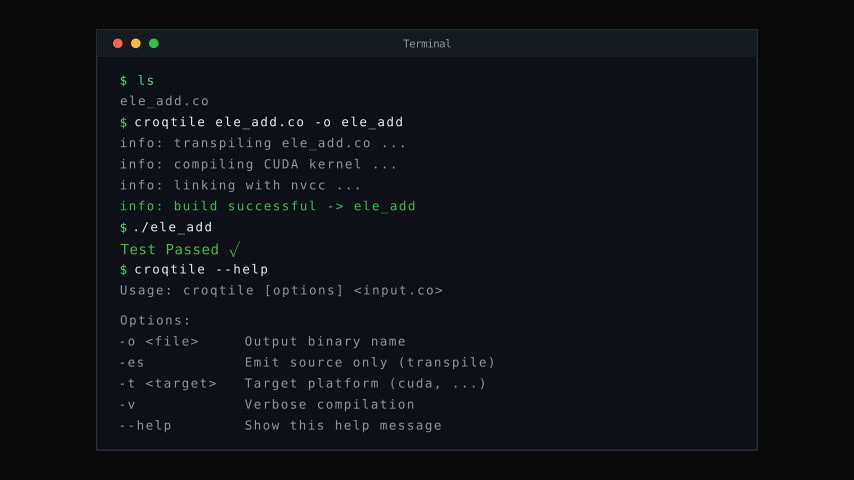
Compiling and running a Croqtile program, plus the --help output.
Animated version
What You Have So Far
The skeleton of every Croqtile program is now in your hands: a __co__ function with typed, shaped parameters and a return value; parallel and .at() for element-wise computation; lhs.span for deriving output shapes from inputs; and the host-side make_spandata / .view() API for creating and passing tensors.
The example works, but it processes one element at a time with no control over how data moves through the memory hierarchy. On real hardware that matters — GPUs achieve peak throughput by moving data in bulk, not element by element. The next chapter introduces dma.copy and chunkat to express block-level data movement.