Parallelism: How Croqtile Represents Parallel Work
The previous two chapters kept things simple: parallel {i, j} by [4, 8] created 32 instances, each handling one element, and we never asked where those instances actually ran. That was fine for element-wise addition and for understanding data movement — the compiler picked sensible defaults. But a GPU is not a flat bag of identical processors. It has a deep hierarchy of execution units, and mapping your work to the right level of that hierarchy is the difference between a toy demo and a real kernel.
This chapter introduces parallelism as a first-class concept in Croqtile: what it means, how Croqtile separates the logical structure (what runs concurrently) from the physical mapping (which hardware units run it), and how you control that mapping with space specifiers.
How We Think About Parallel Tasks
Before we touch any Croqtile syntax, let's talk about what "parallel" actually means.
Suppose you have eight independent tasks — eight tiles to add, eight rows to process, whatever. You can describe all eight at once and call them "parallel." But that statement says nothing about how many actually run at the same time. On a single CPU core, they execute one after another. On a 4-core CPU, maybe four run simultaneously. On a GPU warp, all eight might genuinely execute in lockstep.
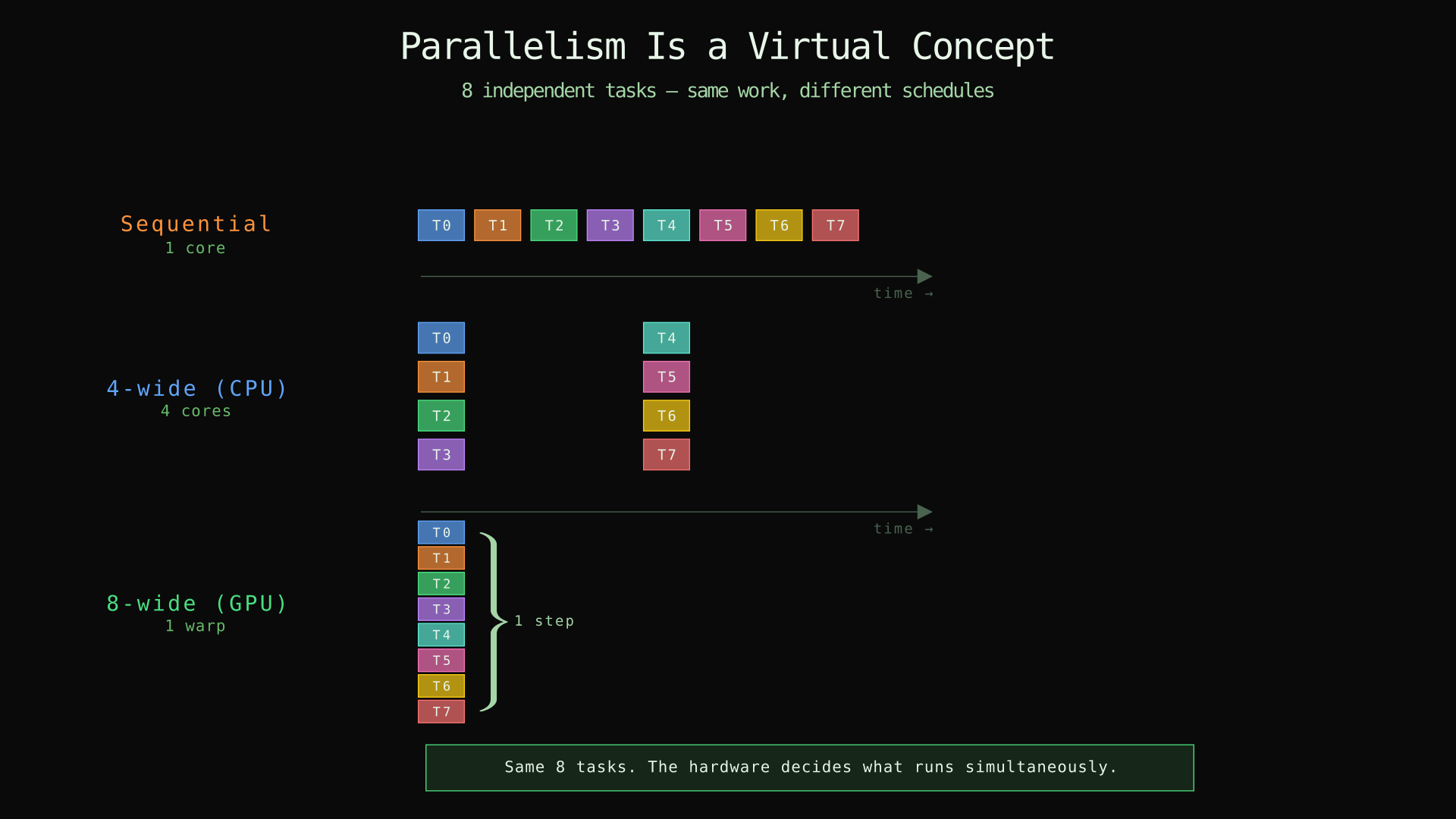
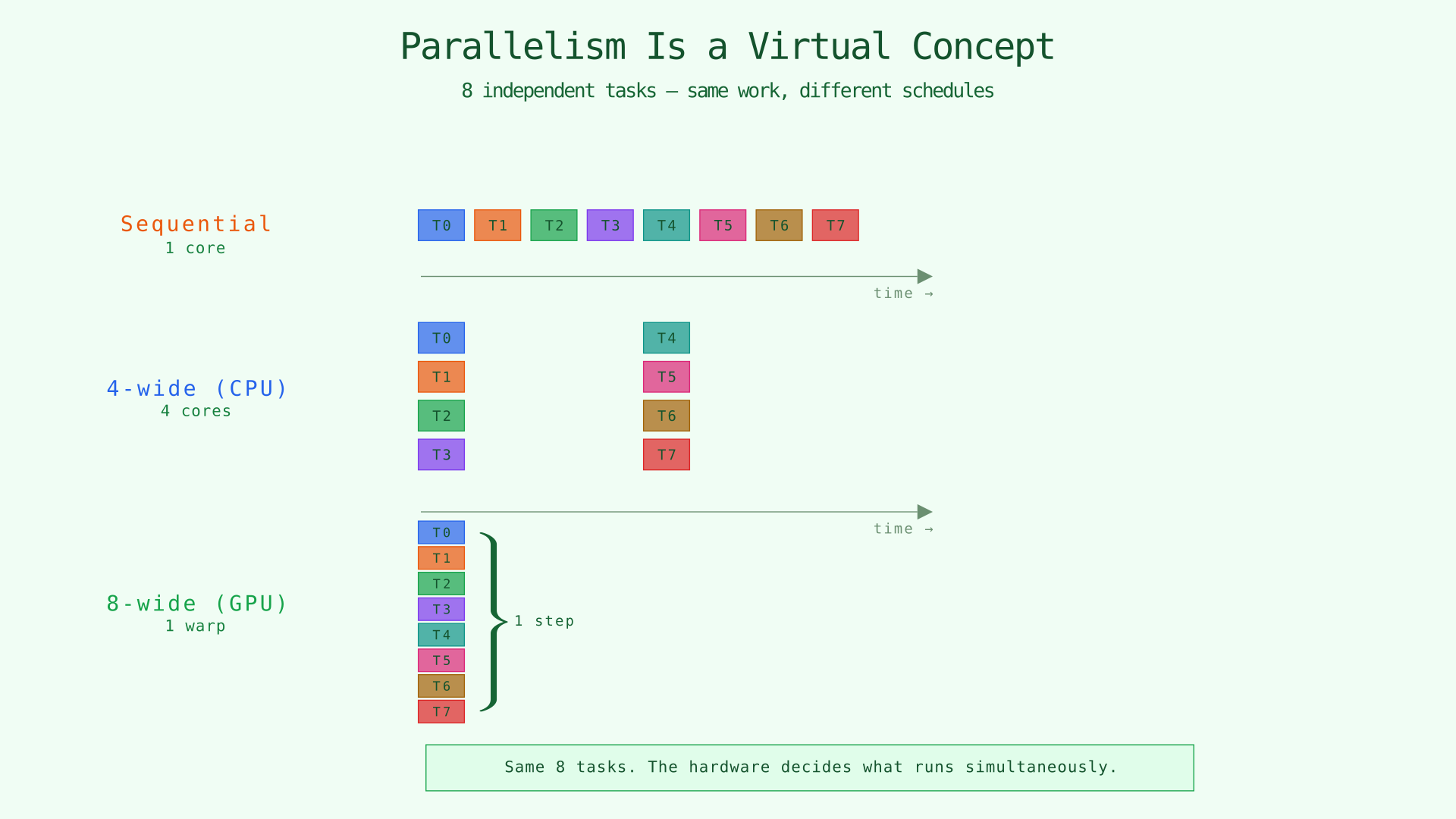
The same eight tasks scheduled sequentially (1 core), 4-wide (CPU), and 8-wide (GPU). The tasks are identical — only the hardware changes.
The point is that parallelism is a virtual concept. When you write "these eight tasks are independent," you are making a statement about the logic of your program, not about the hardware. The hardware decides how many actually run simultaneously, based on how many execution units it has and how the scheduler assigns work.
This distinction matters because GPU programming languages traditionally conflate the two. In CUDA, you launch a kernel with <<<blocks, threads>>> — that is simultaneously declaring the logical structure (how many instances) and the physical mapping (how many thread blocks, how many threads per block). If you want to change the tiling, you also have to change the launch configuration. The logical and physical are tangled together.
Croqtile untangles them.
Croqtile's Two-Layer Parallelism Model
Croqtile gives you two separate knobs:
parallel— declares that iterations are independent and may run concurrently. This is a logical statement.- Space specifiers (
: block,: thread,: group,: group-4) — tell the compiler which GPU hardware unit each parallel axis maps to. This is a physical statement.
And there is foreach, which is the opposite of parallel: iterations run sequentially, in order. Use foreach when later iterations depend on earlier ones — an accumulation loop, a K-dimension reduction, a pipeline that loads tile k before computing with it.
parallel {px, py} by [8, 16] : block    // concurrent — mapped to thread blocks
  foreach {tile_k} in [16]               // sequential — K-dimension loop
    parallel {qx, qy} by [16, 16] : thread  // concurrent — mapped to threads
      foreach k in [16]                      // sequential — inner accumulation
        output += lhs * rhs;
The parallel lines say "these iterations are independent." The : block and : thread annotations say "put the outer ones on separate thread blocks and the inner ones on separate threads within a block." The foreach lines say "run these in order." No ambiguity, no conflation.
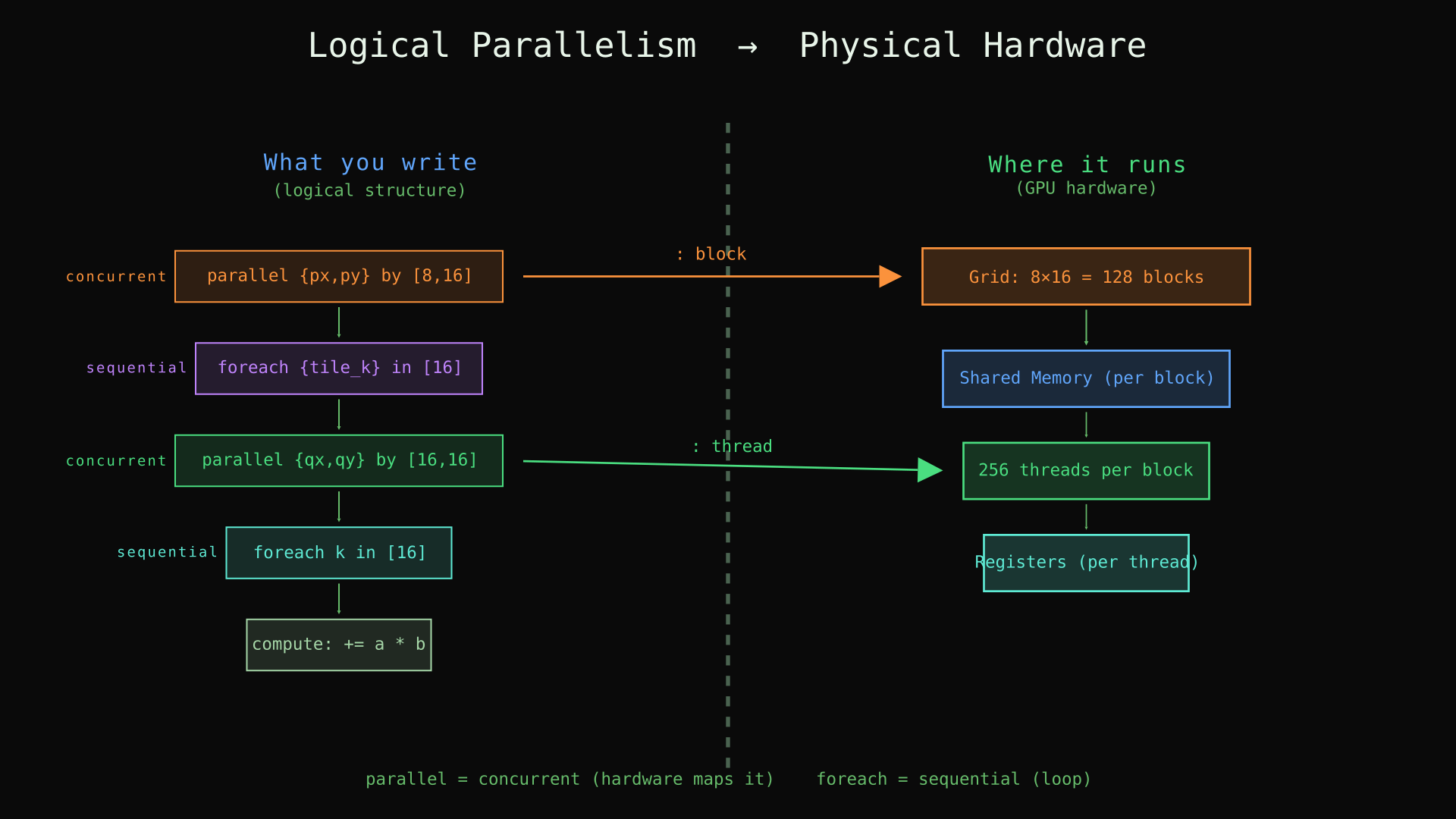
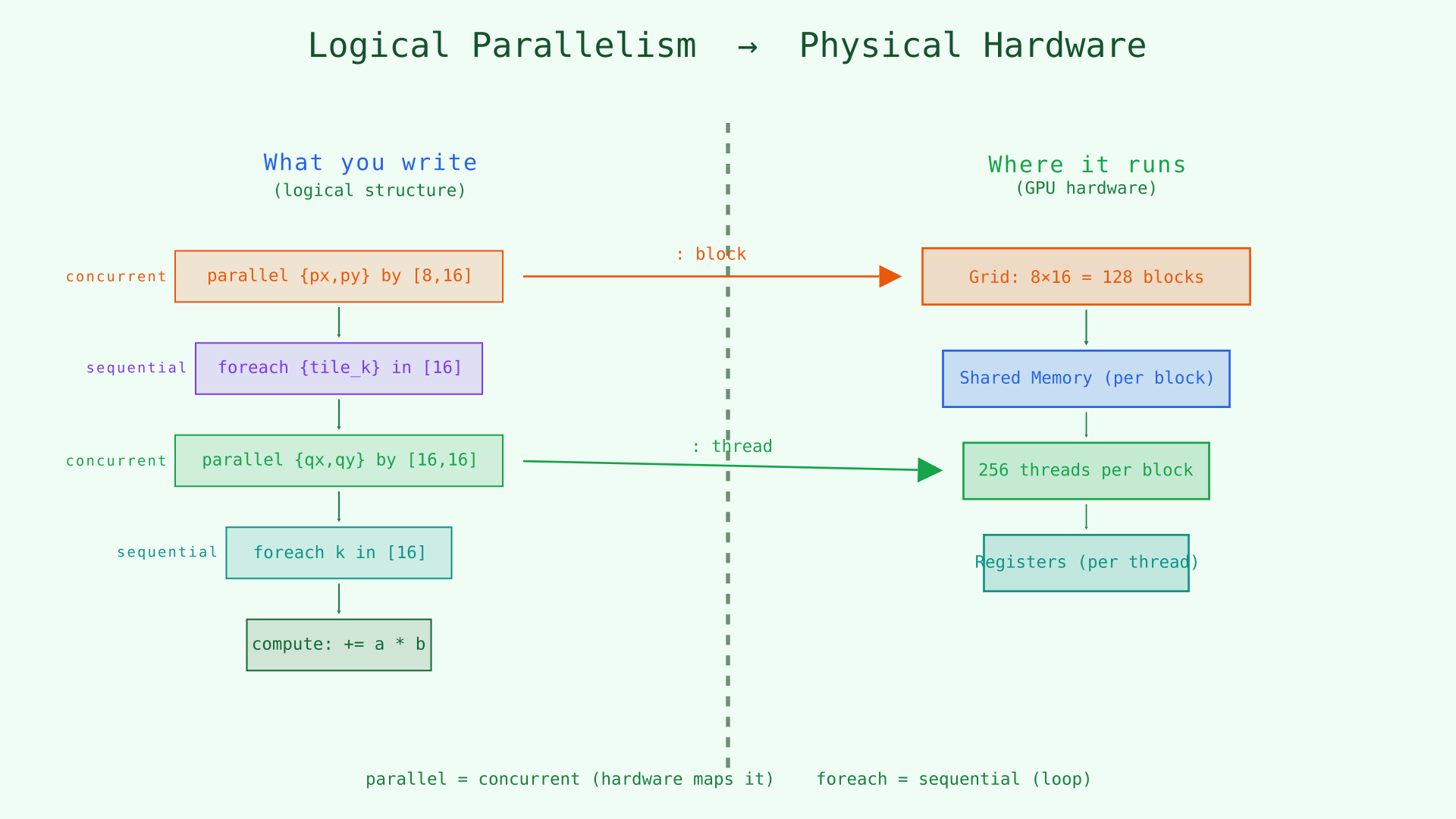
Left: the logical nesting the programmer writes (parallel = concurrent, foreach = sequential). Right: the GPU hardware hierarchy. Space specifiers bridge the two.
If you omit the space specifier — just parallel p by 8 — the compiler picks a default mapping. That is what Chapters 1 and 2 did, and it worked fine for simple cases. Explicit specifiers are how you take control when performance matters.
Both parallel and foreach support multi-dimensional indices ({a, b} syntax), the compose operator (#), and the extent operator (#p). Everything from Chapters 1 and 2 still applies.
Space Specifiers and Hardware Mapping
A GPU has a clear execution hierarchy. From coarsest to finest:
- A thread block (CTA) is a group of up to 1024 threads that share on-chip memory and can synchronize with each other.
- A warpgroup is four warps — 128 threads — that cooperate on wide matrix instructions (WGMMA on Hopper GPUs).
- A warp is 32 threads that execute in lockstep. This is the GPU's fundamental SIMD unit.
- A thread is a single execution context with its own registers.
Croqtile maps to each level with a space specifier:
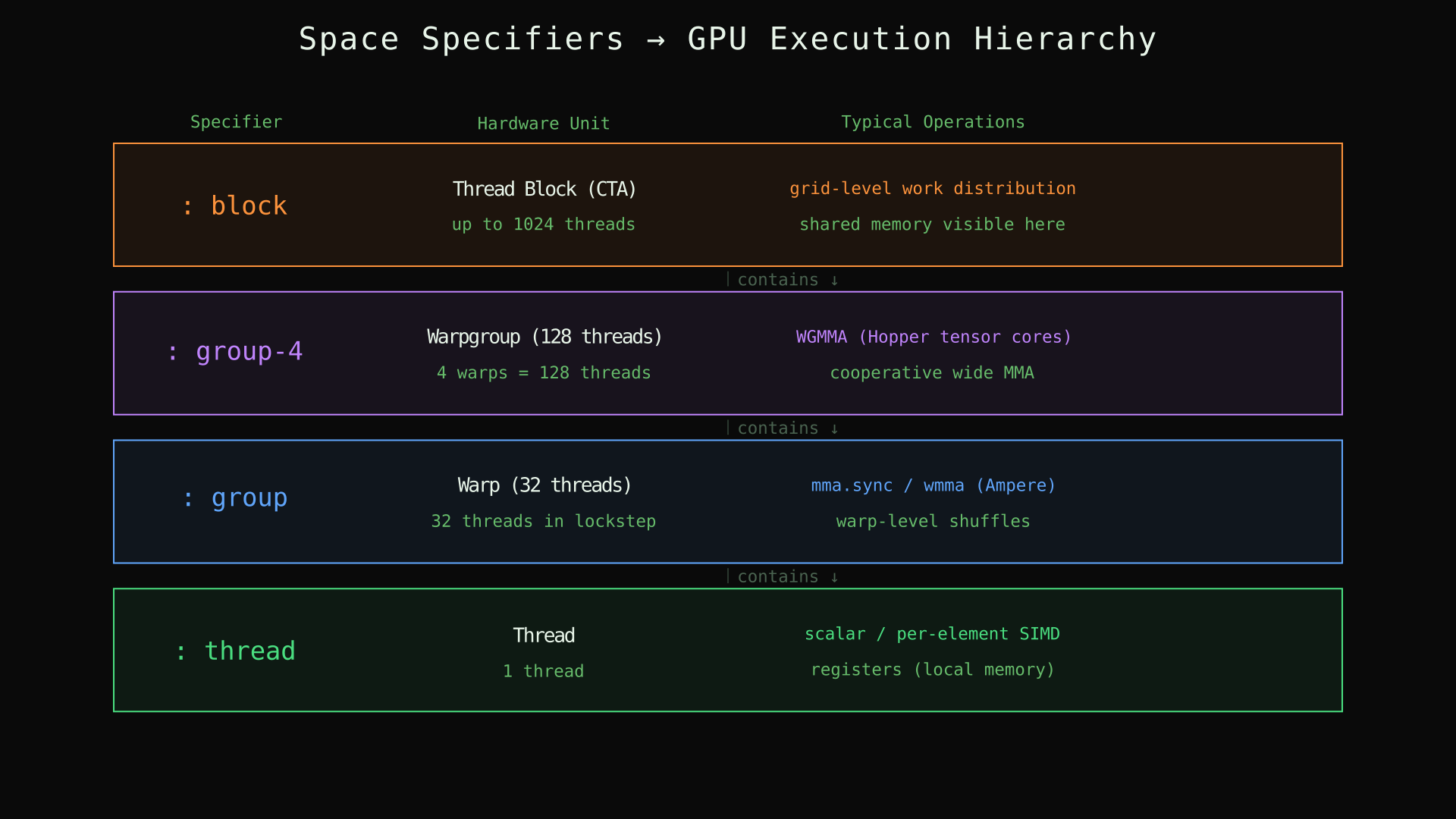
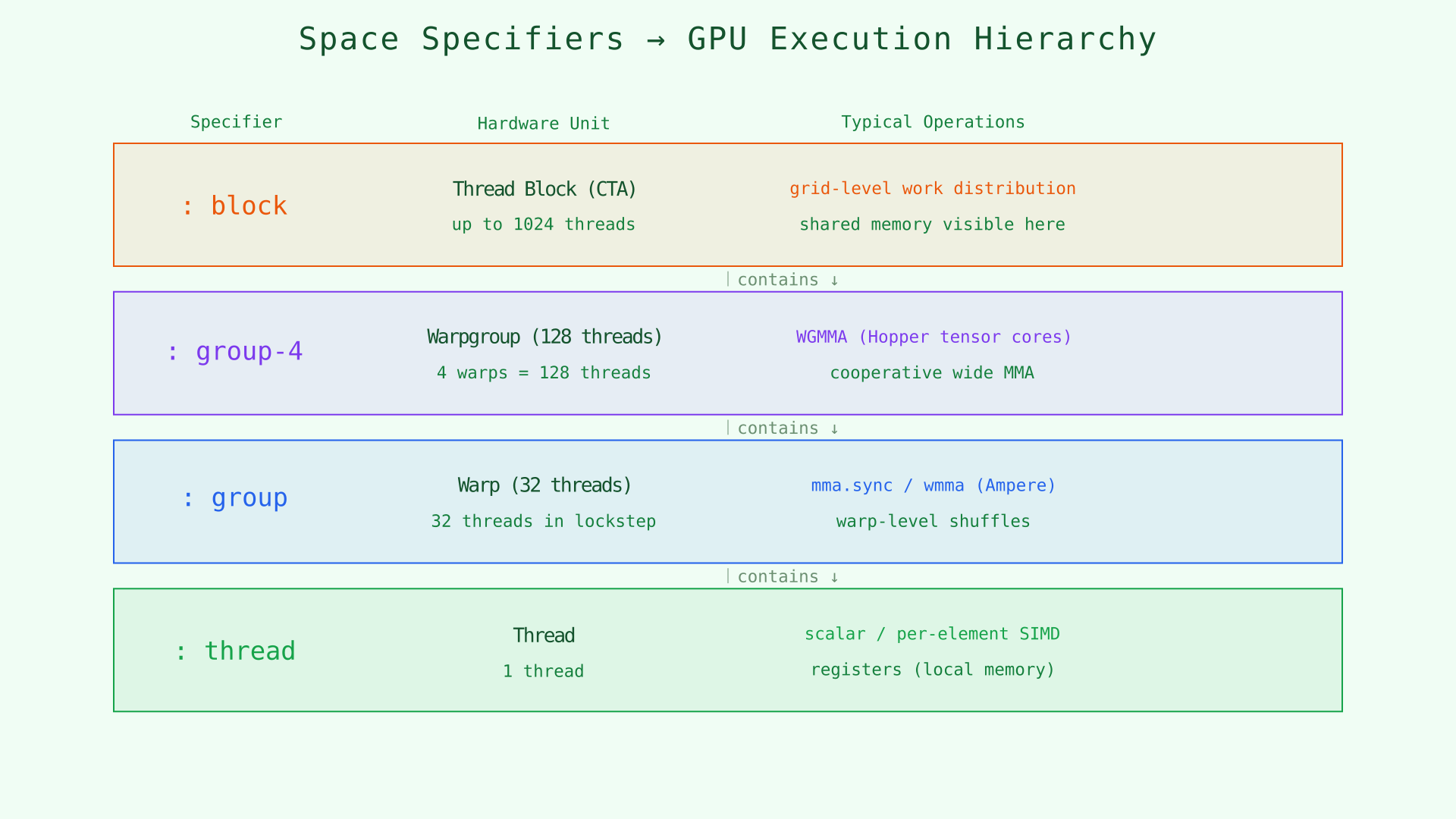
The four space specifiers and the GPU hardware units they map to, with thread counts and typical operations at each level.
: block — Thread Blocks
parallel {px, py} by [8, 16] : blockThis creates an 8 × 16 = 128 block grid. Each block runs on a streaming multiprocessor (SM) and has its own allocation of shared memory. Blocks cannot communicate with each other during execution — they are truly independent.
Use : block for the outermost tiling of your output. If your output is [128, 256] and each block handles a [16, 16] tile, you need 128/16 × 256/16 = 8 × 16 = 128 blocks.
: thread — Threads Within a Block
parallel {qx, qy} by [16, 16] : threadThis creates 16 × 16 = 256 threads within the enclosing block. Each thread has its own registers but shares on-chip memory with all other threads in the same block.
Use : thread for the finest-grain parallelism — the per-element work within a tile.
: group — Warps
parallel w by 4 : groupThis creates 4 warps, each of 32 threads. Warps execute in lockstep (all 32 threads run the same instruction simultaneously). Warp-level operations like mma.sync (Ampere-era tensor core instructions) operate at this granularity.
: group-4 — Warpgroups
parallel g by 2 : group-4This creates 2 warpgroups, each containing 4 warps (128 threads). On Hopper GPUs (compute capability 9.0+), WGMMA instructions require a full warpgroup to cooperate. Even when you have just one warpgroup (parallel p by 1 : group-4), the annotation tells the compiler that these 128 threads form a cooperative unit.
Multiple warpgroups per block is how you scale work along one dimension without adding more blocks — both warpgroups share the same shared memory but maintain independent accumulators. Chapter 4 puts this to work with tensor-core operations.
Nesting Specifiers
Real kernels nest these levels. A common pattern:
parallel {px, py} by [8, 16] : block {
  parallel {qx, qy} by [16, 16] : thread {
    // 128 blocks × 256 threads = 32,768 threads total
  }
}
The outer parallel creates the block grid. The inner parallel creates threads within each block. The braces {px, py} introduce multi-dimensional indices — shorthand for two nested parallel lines.
How shared Enables Reuse
Space specifiers interact directly with memory specifiers. Recall from Chapter 2 that dma.copy ... => shared places data in block-scoped shared memory, while => local places data in thread-private local memory.
The choice matters because of data reuse. Consider a tile that every thread in a block needs to read:
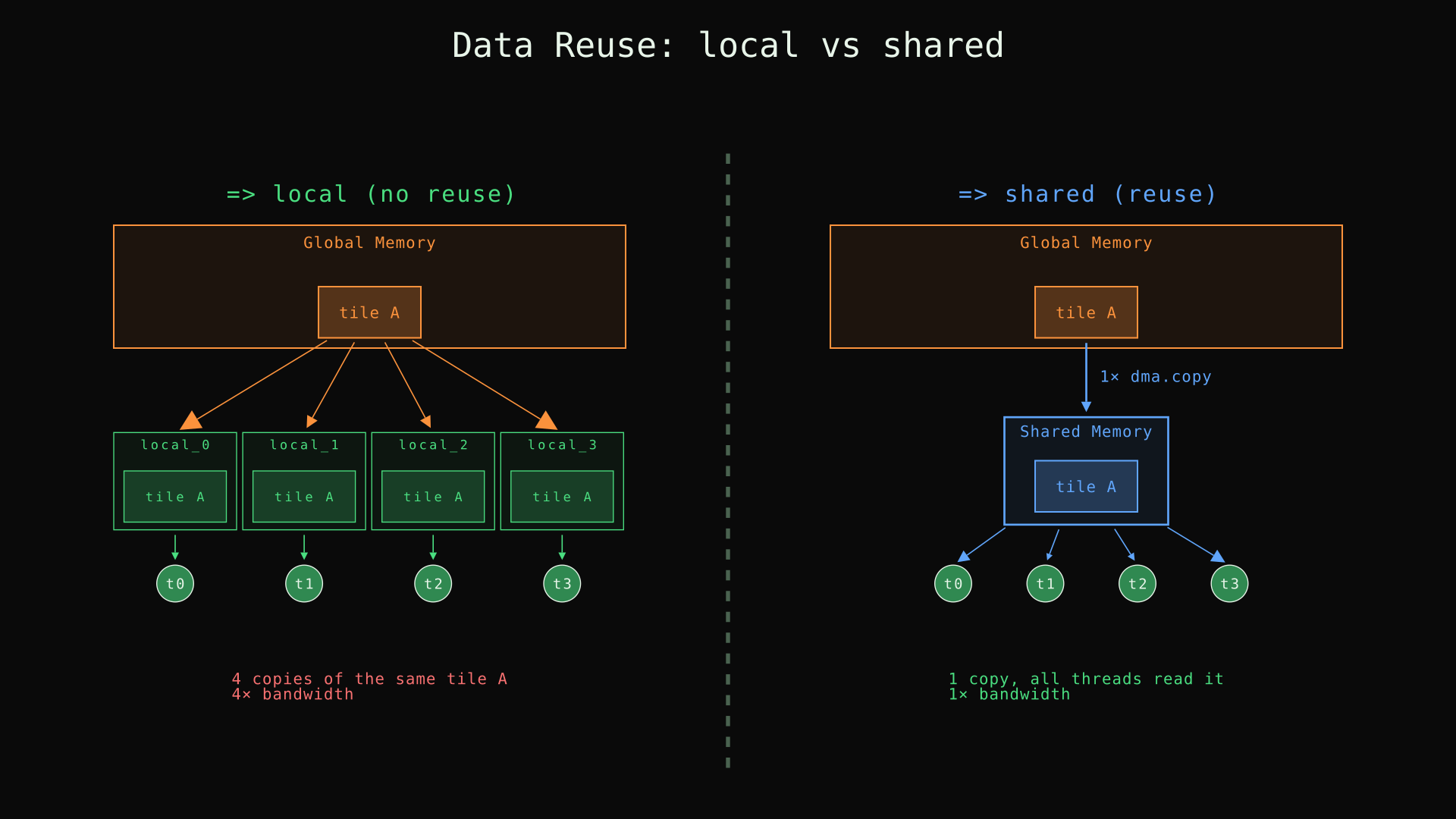
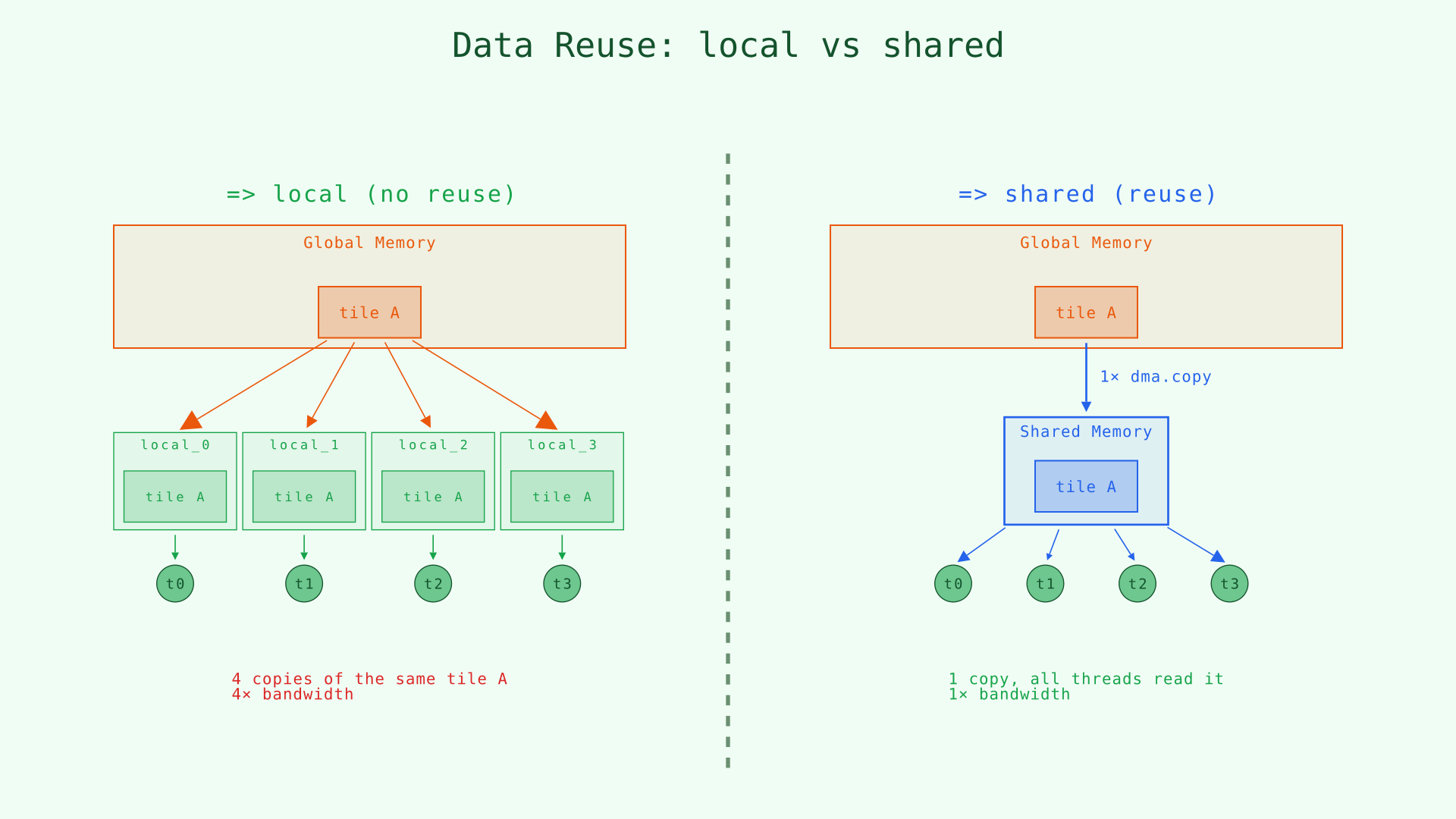
Left: with => local, each thread loads its own copy — 4× the bandwidth. Right: with => shared, one DMA fills shared memory and all threads read from it — 1× the bandwidth.
The rule of thumb: if multiple threads in a block need the same data, copy it into shared. If each thread's working set is independent, local keeps data closer and avoids shared-memory bank contention.
In the matmul later in this chapter, the K-tiles of lhs and rhs are loaded => shared because all 256 threads in the block read from them. The output accumulator stays in registers (thread-private) because each thread writes to its own element.
Type System Aside: mdspan and ituple
Before we build the matmul, two features of Croqtile's type system are worth mentioning. You have already used them implicitly; now is a good time to name them.
mdspan — every tensor in Croqtile carries its shape as part of its type. When you write s32 [128, 256] lhs, the shape [128, 256] is not a runtime value — it is a compile-time property. The compiler uses it to verify that every .at(), chunkat, and dma.copy is dimensionally consistent. If you try lhs.at(i, j, k) on a 2D tensor, the compiler rejects it. The expression output.at(px#qx, py#qy) is verified to produce indices within the output's bounds.
The span(i) syntax extracts one dimension: lhs.span(0) is 128, rhs.span(1) is 256. The shorthand lhs.span copies the entire shape.
ituple — the {px, py} syntax in parallel {px, py} by [8, 16] introduces an ituple, a compile-time integer tuple. The compose operator px#qx combines two ituple elements into a global index. The extent operator #p extracts the upper bound of a parallel variable. These are all resolved at compile time — no runtime overhead.
For the full details, see the mdspan reference and the ituple reference. For now, the key takeaway is: Croqtile catches shape mismatches at compile time, not at runtime.
Matrix Multiply: Putting It Together
With parallel, foreach, dma.copy, chunkat, #, and space specifiers, a tiled matrix multiply is within reach. This is the first program in the tutorial that does something GPUs are famous for.
The plan: multiply a [128, 256] matrix by a [256, 256] matrix to get a [128, 256] result.
Scalar Matmul (No DMA)
Start with just parallel and .at() — global memory, no explicit data movement:
__co__ s32 [128, 256] matmul(s32 [128, 256] lhs, s32 [256, 256] rhs) {
  s32 [lhs.span(0), rhs.span(1)] output;

  parallel {p, q} by [16, 64] {
    foreach index = {m, n, k} in [128 / #p, 256 / #q, 256]
      output.at(p#m, q#n) += lhs.at(p#m, k) * rhs.at(k, q#n);
  }

  return output;
}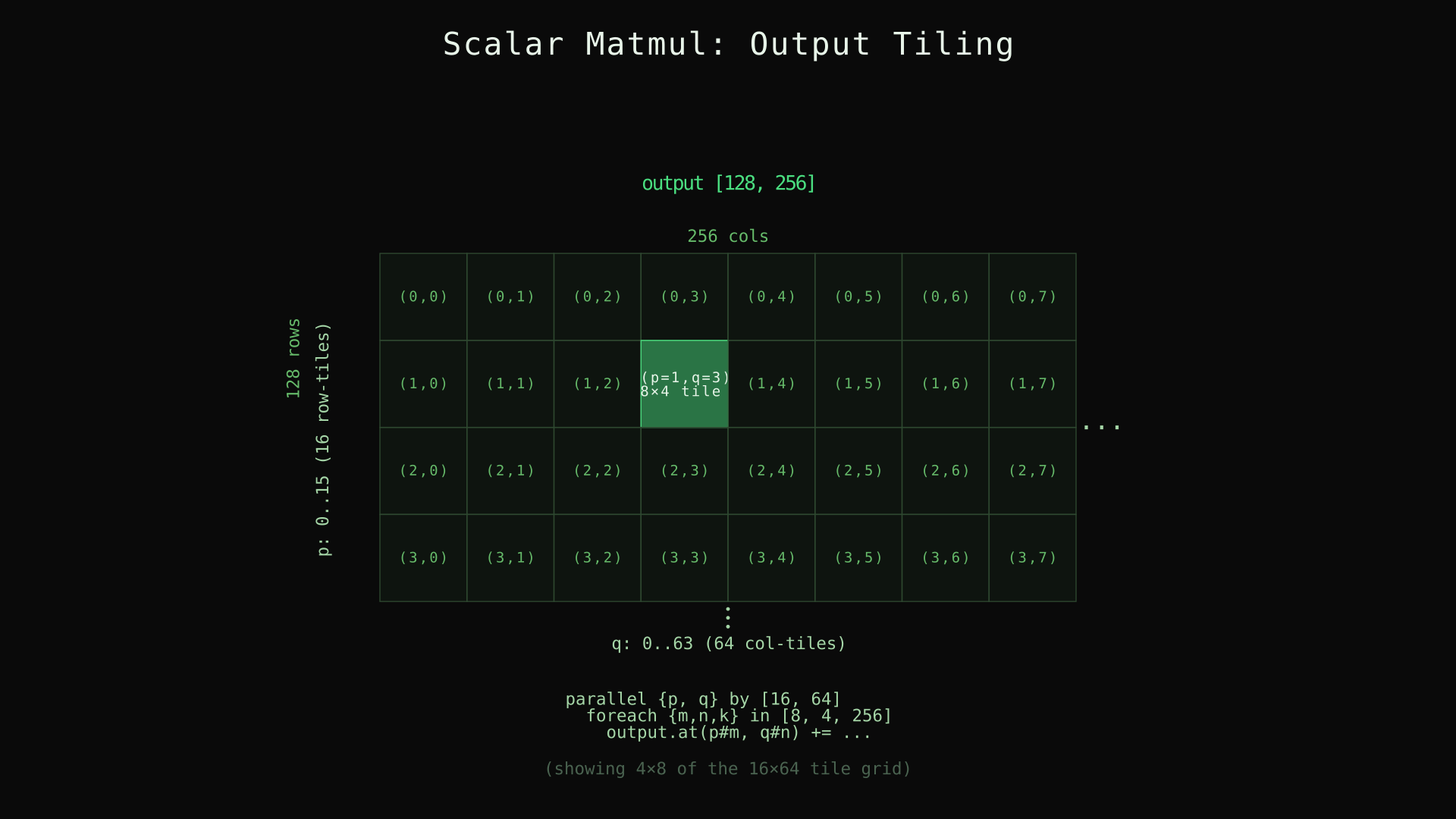
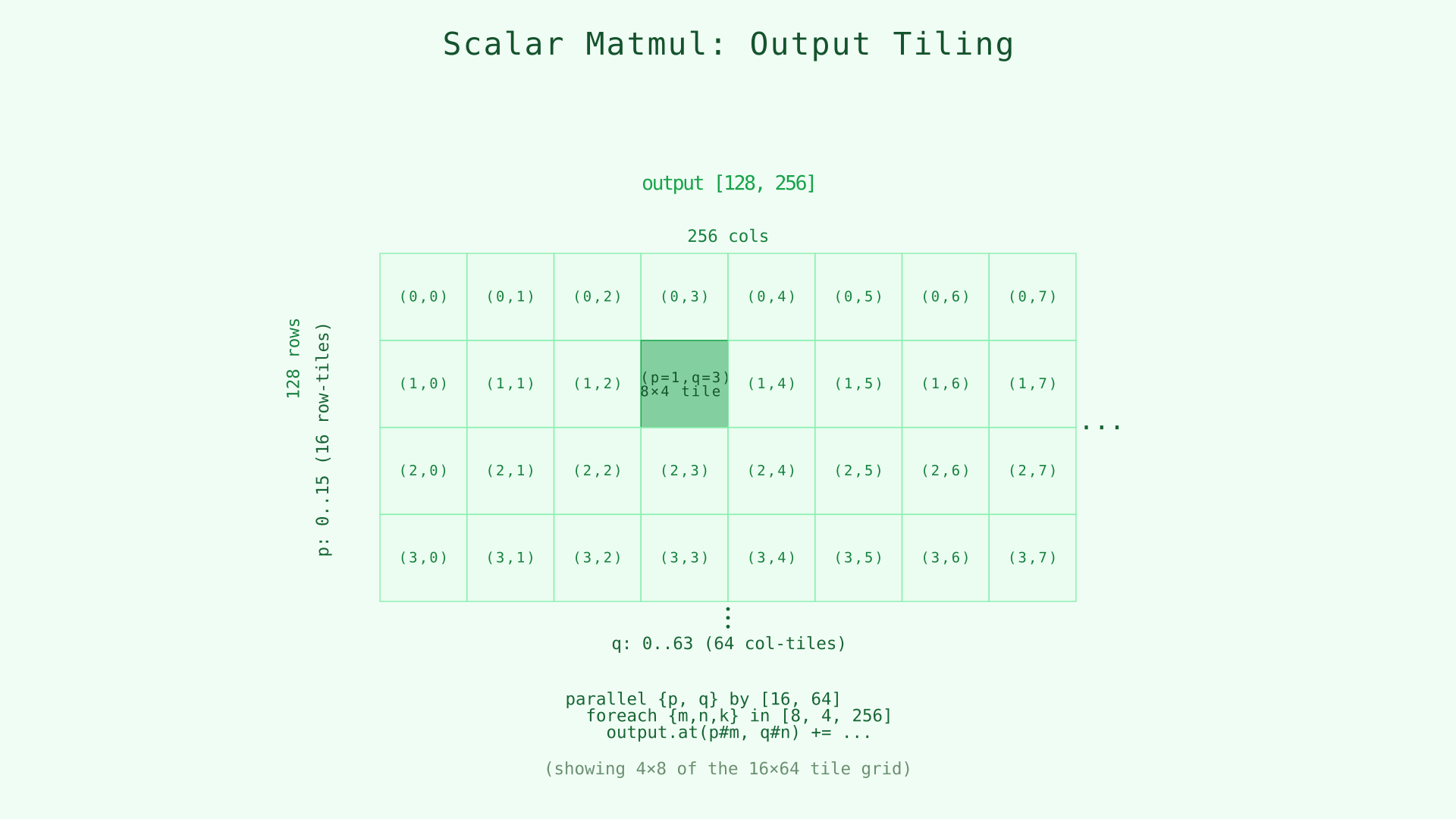
The [128, 256] output divided into a 16 × 64 tile grid. Each (p, q) pair owns one tile.
This is dense — here is what each piece does.
Output shape from operand dimensions. s32 [lhs.span(0), rhs.span(1)] output builds the output shape from the inputs: lhs.span(0) is 128 (rows of the left matrix) and rhs.span(1) is 256 (columns of the right matrix).
Multi-axis parallel. parallel {p, q} by [16, 64] declares two parallel indices of one parallel level with a comma. This creates a 16 × 64 = 1024-way parallel grid. Each (p, q) pair owns a tile of the output.
Named tuple destructuring. foreach index = {m, n, k} in [128 / #p, 256 / #q, 256] introduces three nested loop indices — m, n, k — bound to a tuple called index. The trip counts are:
128 / #p = 128 / 16 = 8rows per tile256 / #q = 256 / 64 = 4columns per tile256for the full contraction dimension
Composed global indices. p#m composes the tile index with the within-tile offset. p selects which of the 16 row-tiles, m runs 0..7 within that tile, so p#m covers 0..127 across all tiles.
The arithmetic. output.at(p#m, q#n) += lhs.at(p#m, k) * rhs.at(k, q#n) is the textbook dot product: for each output element, sum products along K. Every .at() here reads from global memory.
DMA Matmul: Tiles in Shared Memory
The scalar version works but every multiply reads from global memory. Bringing K-tiles into shared memory lets all threads in a block reuse them:
__co__ s32 [128, 256] matmul(s32 [128, 256] lhs, s32 [256, 256] rhs) {
  s32 [lhs.span(0), rhs.span(1)] output;

  parallel {px, py} by [8, 16] : block {
    foreach {tile_k} in [16] {
      lhs_load = dma.copy lhs.chunkat(px, tile_k) => shared;
      rhs_load = dma.copy rhs.chunkat(tile_k, py) => shared;

      parallel {qx, qy} by [16, 16] : thread {
        foreach k in [256 / #tile_k]
          output.at(px#qx, py#qy) += lhs_load.data.at(qx, k) * rhs_load.data.at(k, qy);
      }
    }
  }

  return output;
}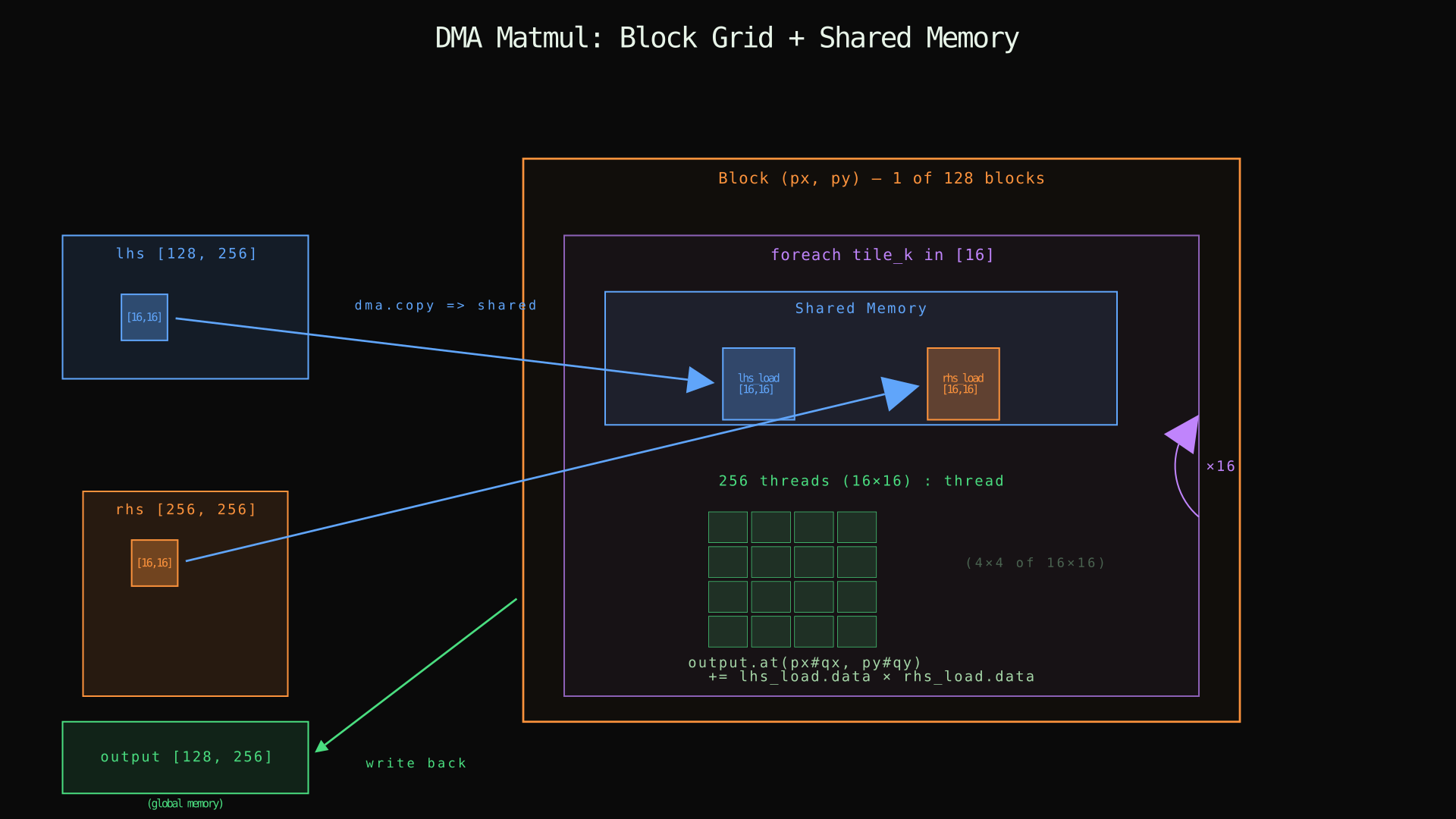
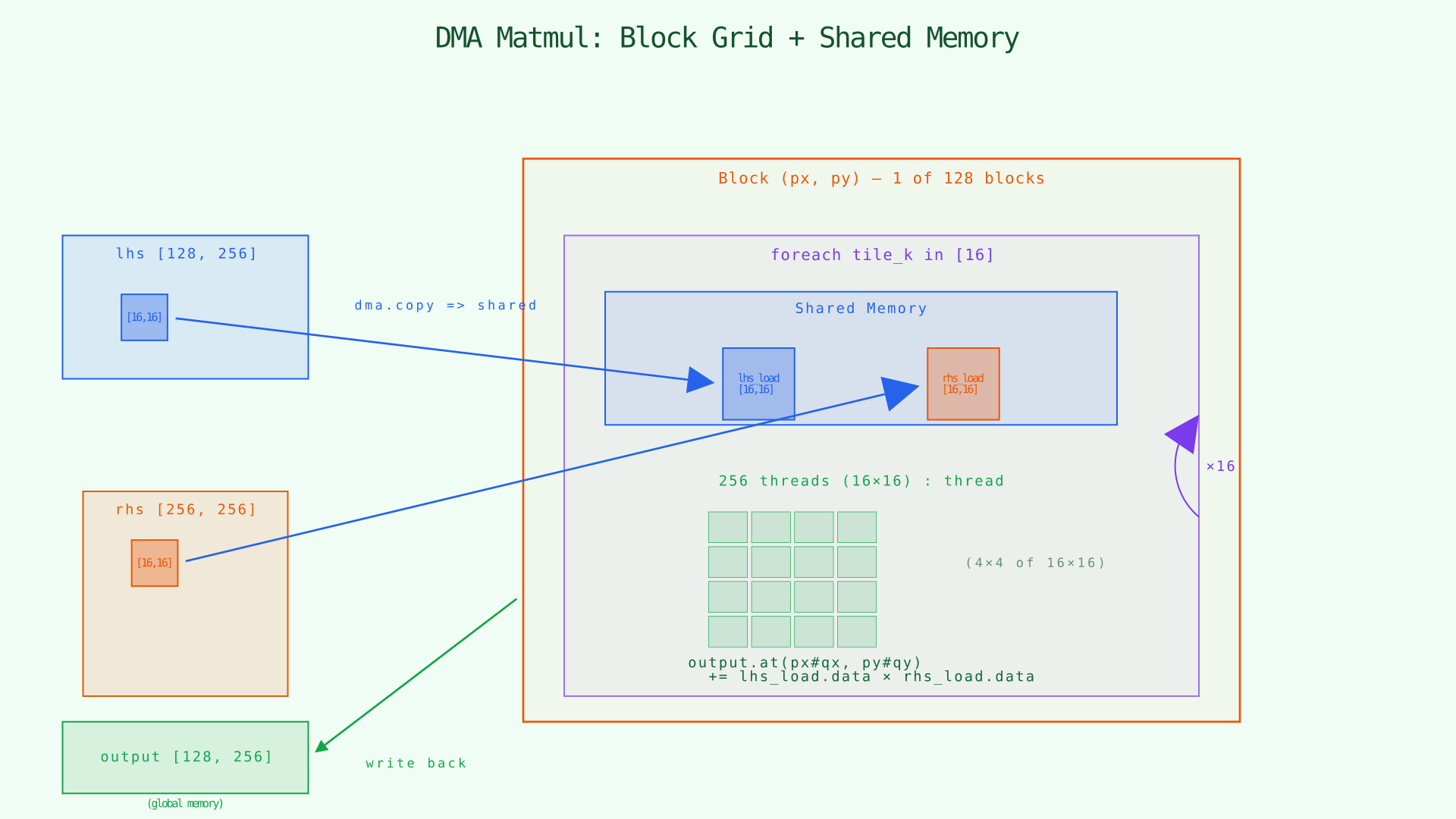
One block in detail: the K-loop loads lhs and rhs tiles into shared memory via dma.copy, then 256 threads compute partial products from the shared copies.
What changed from the scalar version:
-
The outer
parallelnow uses: blockwith brace-form indices{px, py}. An 8 × 16 grid of blocks covers the output. -
A
foreachovertile_kwalks the K dimension in 16 steps. Each step copies one strip oflhsand one strip ofrhsintosharedmemory withdma.copy ... => shared. -
An inner
parallel {qx, qy} by [16, 16] : threadcreates 256 threads within each block. Each thread owns one output element within the block's tile. -
The arithmetic reads from
lhs_load.dataandrhs_load.data— the shared-memory copies — instead of globallhsandrhs.
The composed indices work in two layers: px#qx composes block index px with thread index qx to form the global row; py#qy does the same for columns.
Dimension arithmetic. With [8, 16] blocks, each block owns 128/8 = 16 rows and 256/16 = 16 columns. The inner [16, 16] threads subdivide that into one element per thread. Along K, 16 tiles of 256/16 = 16 elements each cover the full contraction.
GPU Resource Layout
Here is how the matmul code maps to actual GPU hardware:
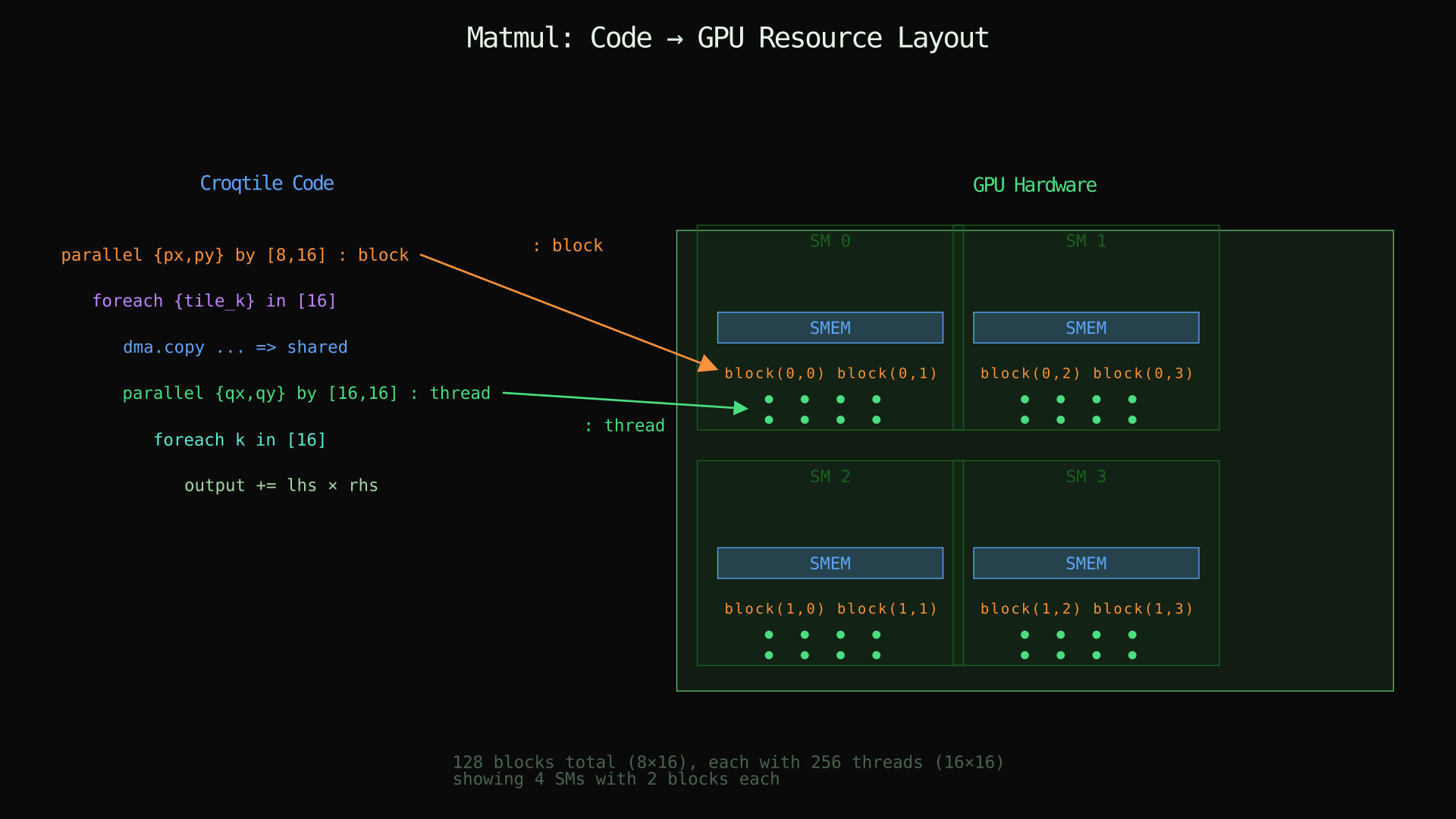
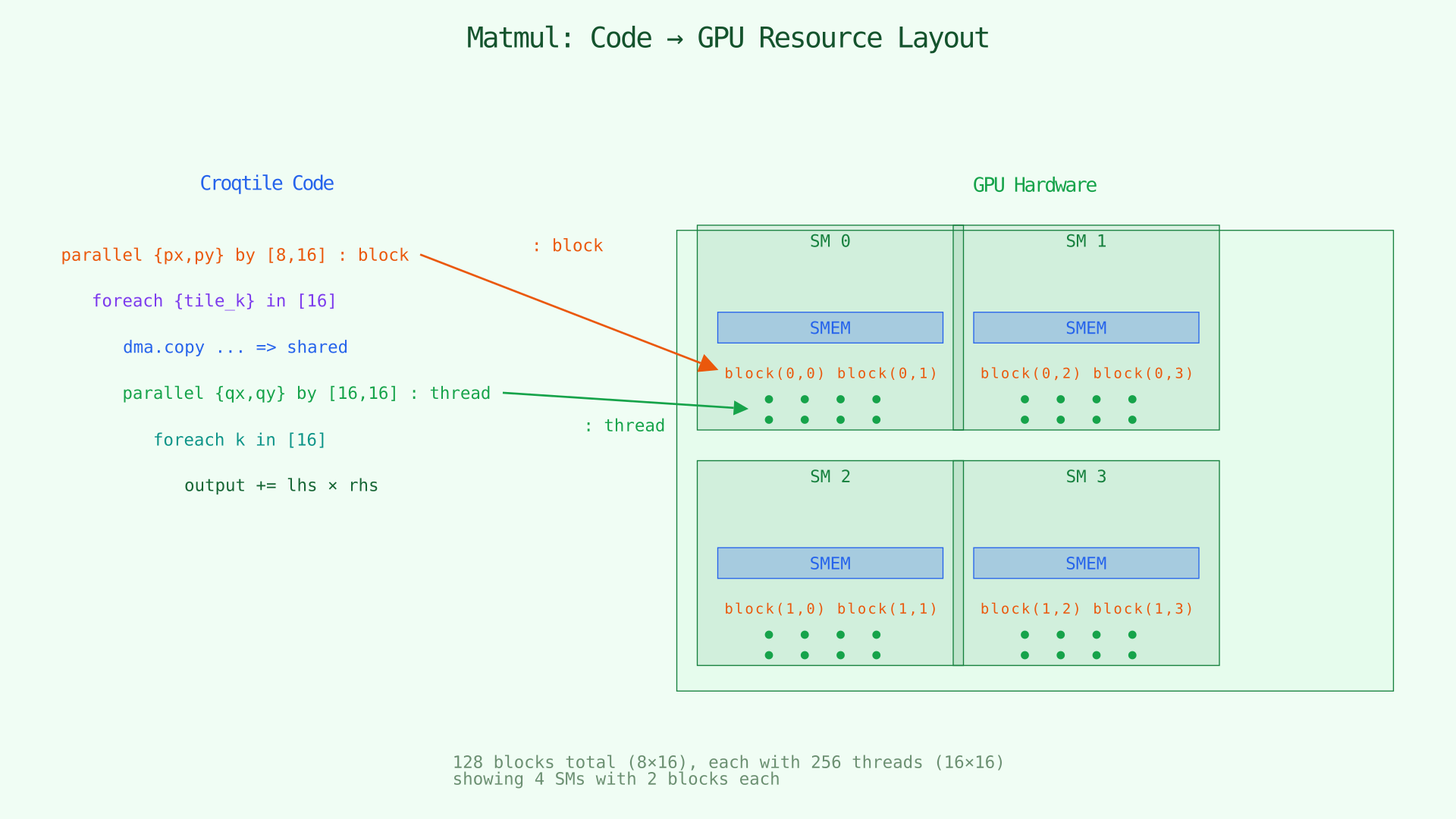
Left: Croqtile code with nested parallel and foreach. Right: GPU hardware — 128 blocks distributed across SMs, each with shared memory and 256 threads.
Host Code
The host side uses the same make_spandata / .view() pattern from earlier chapters:
int main() {
  auto lhs = croq::make_spandata<croq::s32>(128, 256);
  auto rhs = croq::make_spandata<croq::s32>(256, 256);
  lhs.fill_random(-10, 10);
  rhs.fill_random(-10, 10);

  auto res = matmul(lhs.view(), rhs.view());

  for (size_t i = 0; i < res.shape()[0]; ++i)
    for (size_t j = 0; j < res.shape()[1]; ++j) {
      int ref = 0;
      for (size_t k = 0; k < lhs.shape()[1]; ++k)
        ref += lhs[i][k] * rhs[k][j];
      croq::croq_assert(ref == res[i][j], "values are not equal.");
    }

  std::cout << "Test Passed\n" << std::endl;
}
Nothing new here. The host program stays boring so the Croqtile function stays the star.
Tracing One Output Element
Pick global position (row=37, col=50) in the output. Which block and thread own it?
Blocks partition 128 rows into 8 tiles of 16: px = 37 / 16 = 2, offset qx = 37 % 16 = 5. Columns partition 256 into 16 tiles of 16: py = 50 / 16 = 3, offset qy = 50 % 16 = 2. So block (2, 3), thread (5, 2).
For that thread, the K-loop runs 16 iterations. On iteration tile_k = 0, dma.copy loads lhs rows 32..47 and K columns 0..15 into shared lhs_load, and rhs K rows 0..15 and columns 48..63 into shared rhs_load. The inner foreach k in [16] accumulates lhs_load.data.at(5, k) * rhs_load.data.at(k, 2) for k = 0..15 into output.at(37, 50). Then tile_k = 1 loads the next K-strip, and so on. After all 16 iterations, output.at(37, 50) holds the complete dot product — same answer as the scalar reference.
Summary of New Syntax
| Syntax | Meaning |
|---|---|
parallel p by N |
N-way parallelism, index p runs 0..N-1 concurrently |
parallel {px, py} by [M, N] |
Multi-dimensional parallel level ( p and q correspond to one parallel level) |
parallel p by A, q by B |
Comma-separated parallel levels ( p and q correspond to different parallel levels) |
parallel p by N : block |
Map to CUDA thread blocks |
parallel q by N : thread |
Map to threads within a block |
parallel w by N : group |
Map to warps (32 threads each) |
parallel g by N : group-4 |
Map to warpgroups (128 threads each) |
=> shared |
DMA destination: block-scoped shared memory |
foreach index = {m, n, k} in [a, b, c] |
Named tuple destructuring in a foreach |
lhs.span(0) |
Extract one dimension of a tensor's shape |
p # m |
Compose outer tile index p with inner offset m |
The tiled DMA matmul you built in this chapter is the structural backbone of every high-performance GPU kernel. The next chapter replaces the scalar .at() arithmetic in the inner loop with tensor-core operations — hardware-accelerated matrix multiply that processes a 16×16×16 tile in a single instruction.