Data Movement: The Tile Movement Engine
Chapter 1 used scalar indexing: pick one position, read inputs, compute, write output. That is a good way to explain correctness, but it is not how the hardware wants to move data. GPUs fetch and stage contiguous blocks, not isolated elements. The hard part of GPU programming is usually not the arithmetic. It is organizing those block transfers so the compute units see data in the right memory level, in the right shape, at the right time.
Croqtile makes that explicit. Instead of treating data movement as a hidden side effect of indexing, it gives you a small family of tile-movement statements:
dma.copymoves a tile as-is.dma.transp<...>permutes dimensions while moving it.dma.pad<...>enlarges a tile and fills the border.tma.copyuses Hopper's Tensor Memory Accelerator for the same style of transfers when the tile shape is compatible.
This chapter introduces that model, shows the core syntax, and gives the rules you need to write DMA and TMA code that is both correct and likely to lower well.
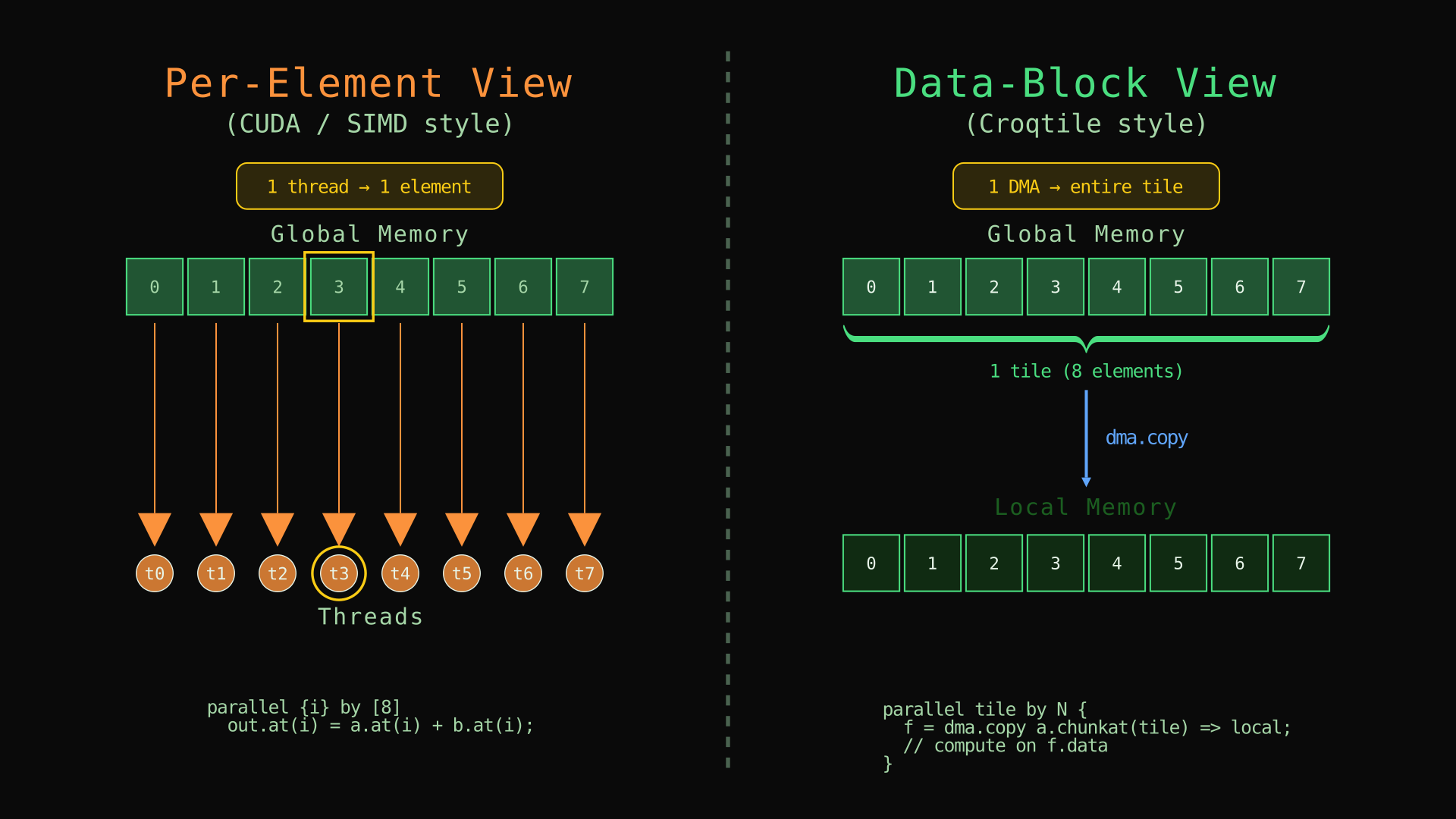
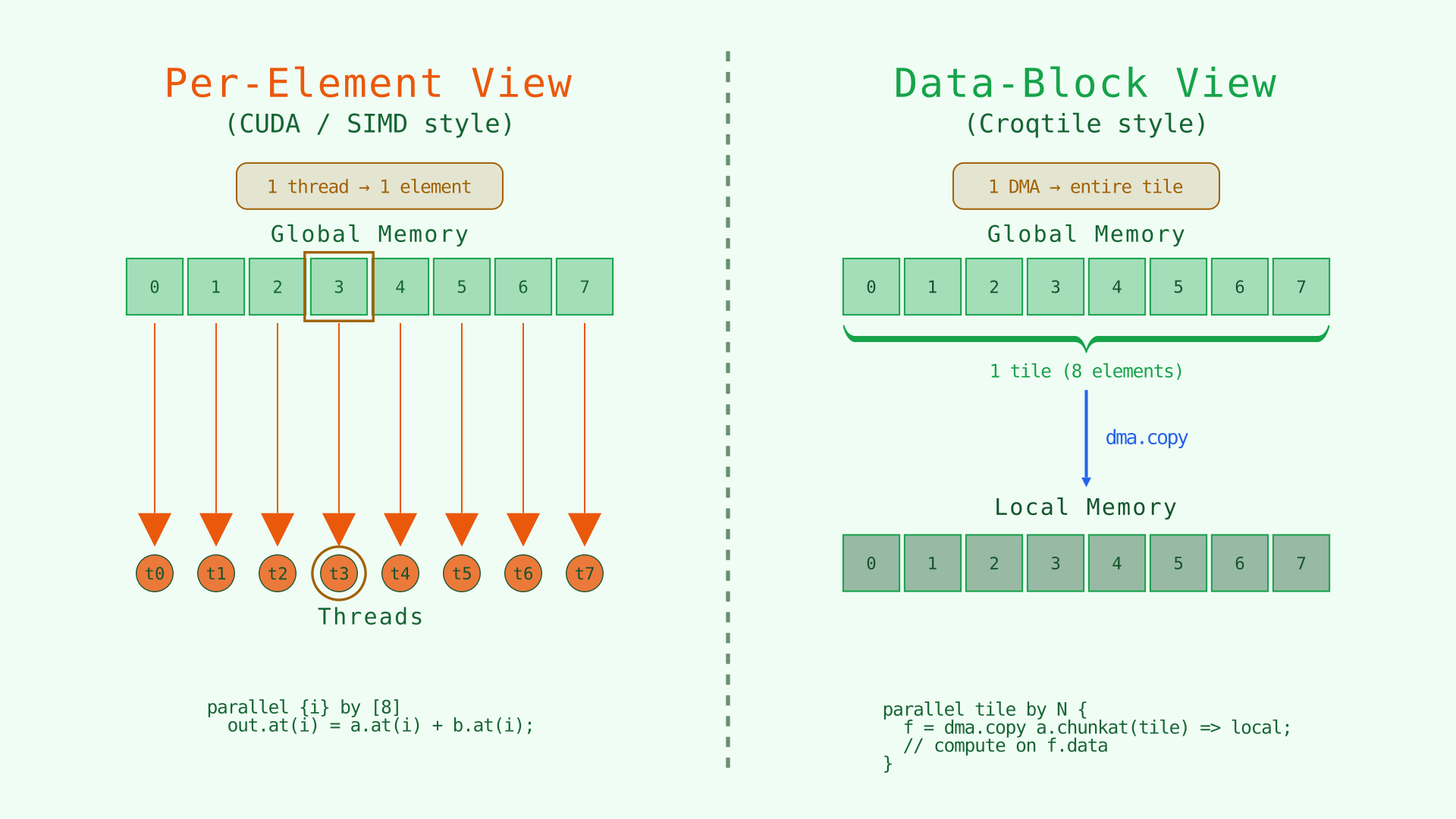
Left: element-by-element thinking. Right: tile-by-tile movement into fast memory.
Animated version
The DMA Statement Family
All of Croqtile's tile-movement operations use the same basic form:
future = engine.operation.modifiers source => destination;The important pieces are:
| Part | Meaning |
|---|---|
future |
Optional handle to the transfer result. Use future.data to access the moved tile and future.span to query its shape. |
engine |
dma for software cooperative copies, tma for Hopper TMA copies. |
operation |
copy, transp<...>, or pad<...>. |
modifiers |
Optional flags such as .async, .zfill, or .swiz<N>. |
source => destination |
The source view and the destination memory or destination view. |
Minimal examples:
f = dma.copy input.chunkat(block) => shared;
g = dma.transp<1, 0> matrix => local;
h = dma.pad<{2, 1}, {3, 2}, {0, 0}, 0> tile => shared;
The key shift from Chapter 1 is that these statements move shaped regions, not individual elements.
First Example: Tiled Addition Through Shared Memory
Here is the same addition from Chapter 1, but staged through shared memory in tiles:
__co__ s32 [64, 128] tiled_add_2d(s32 [64, 128] lhs, s32 [64, 128] rhs) {
  s32 [lhs.span] output;

  parallel {tr, tc} by [4, 8] {
    lhs_load = dma.copy lhs.chunkat(tr, tc) => shared;
    rhs_load = dma.copy rhs.chunkat(tr, tc) => shared;

    foreach {i, j} in lhs_load.span
      output.at(tr # i, tc # j) =
          lhs_load.data.at(i, j) + rhs_load.data.at(i, j);
  }

  return output;
}
The arithmetic is still element-wise addition. What changed is the data path:
chunkat(tr, tc)selects one logical tile from each input.dma.copy ... => sharedstages that tile into block-visible fast memory.- The inner loop reads from
lhs_load.dataandrhs_load.data, not from global memory. tr # iandtc # jmap tile-local coordinates back to global output coordinates.
This is the core Croqtile pattern: select a tile, move it, compute on the moved tile.
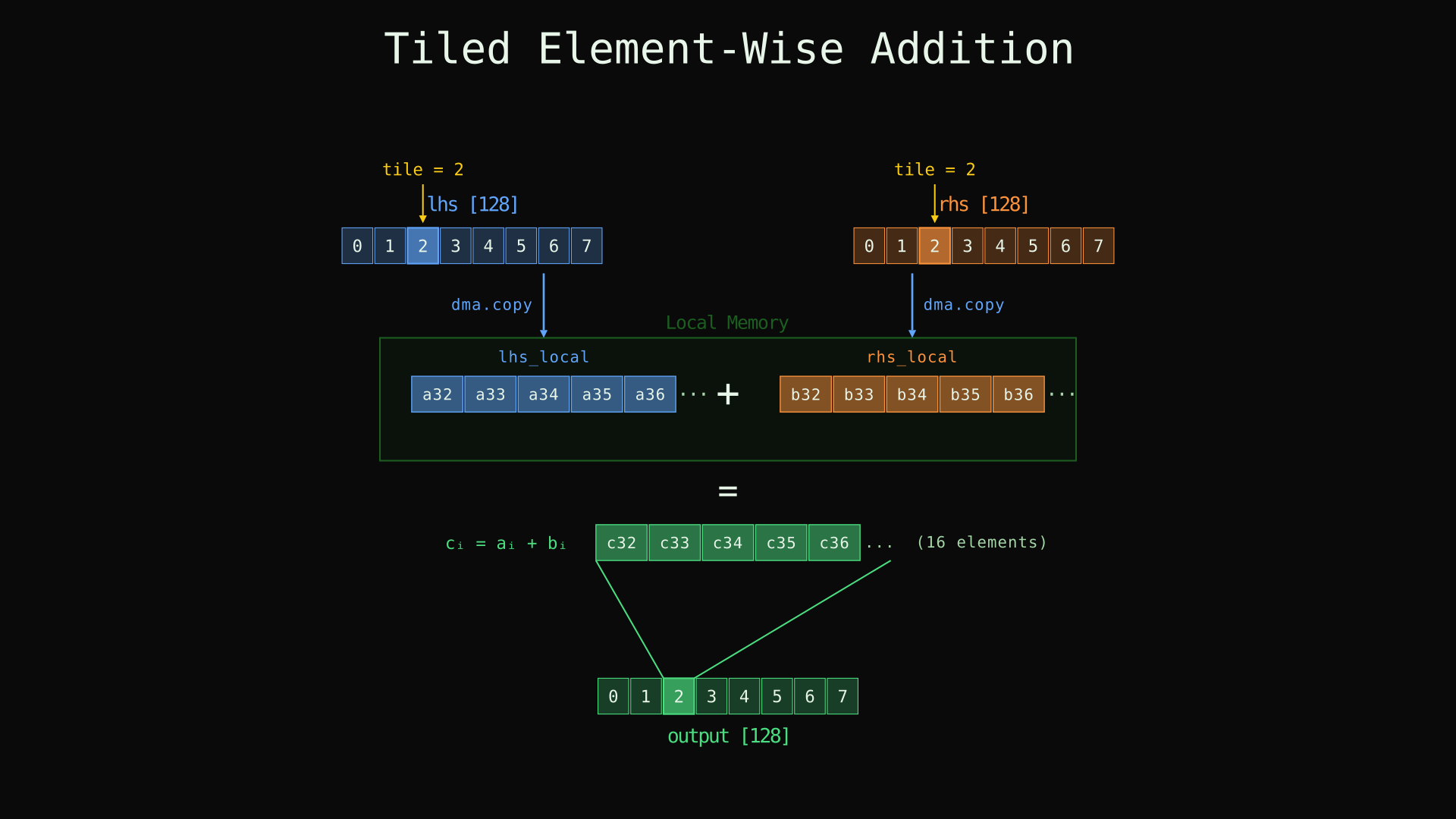
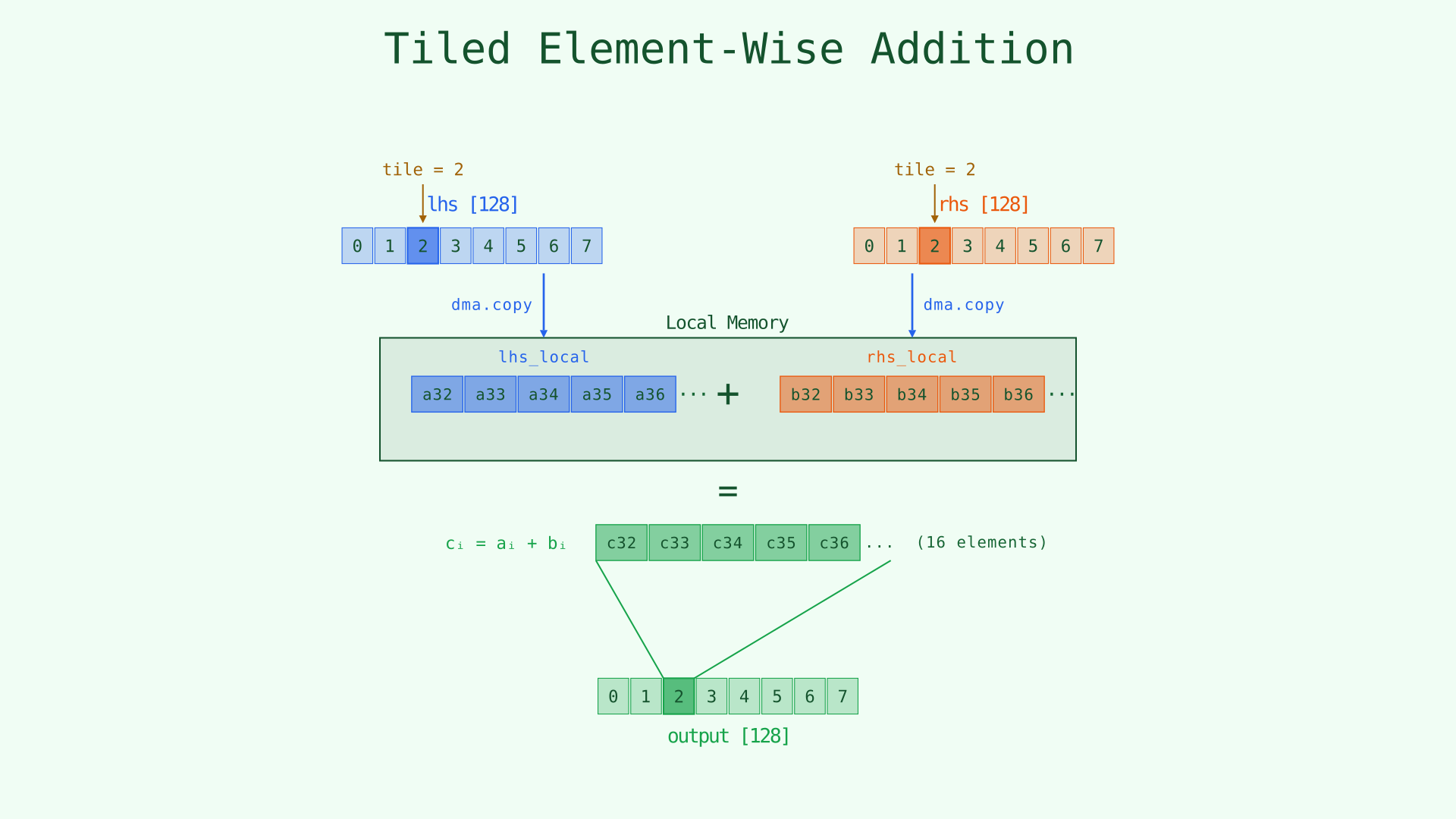
Load a tile, compute on the staged data, then write results back using global coordinates.
Animated version
chunkat, subspan, and view().from(): Three Ways to Select a Tile
Croqtile gives you three common ways to describe the tile you want to move.
chunkat(...): equal partitioning
lhs.chunkat(tr, tc)chunkat divides each dimension into equal chunks based on the surrounding parallel structure. If lhs has shape [64, 128] and the kernel uses parallel {tr, tc} by [4, 8], then lhs.chunkat(tr, tc) selects a [16, 16] tile.
That makes chunkat the natural tool when your tiling follows the parallel decomposition directly.
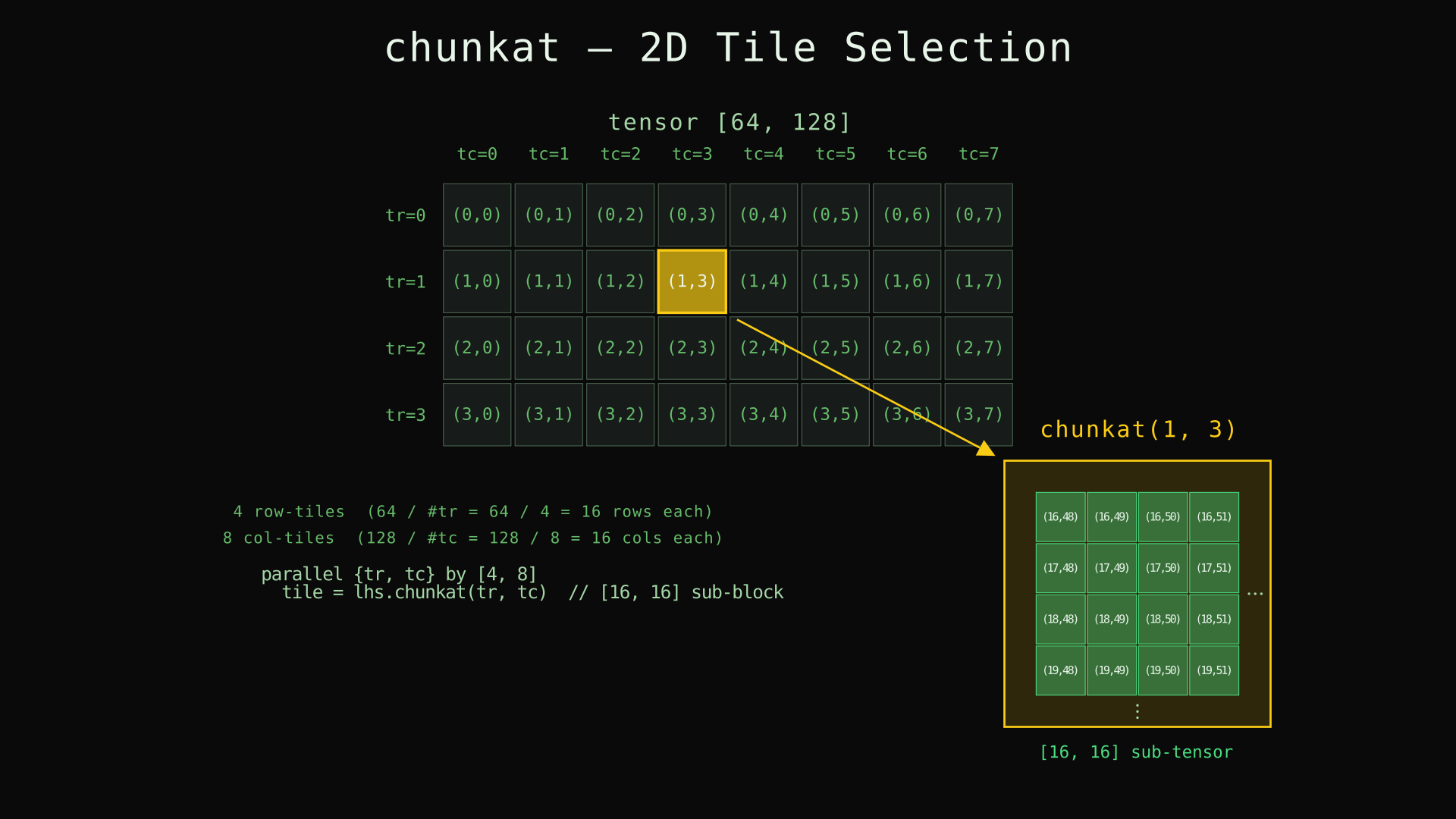
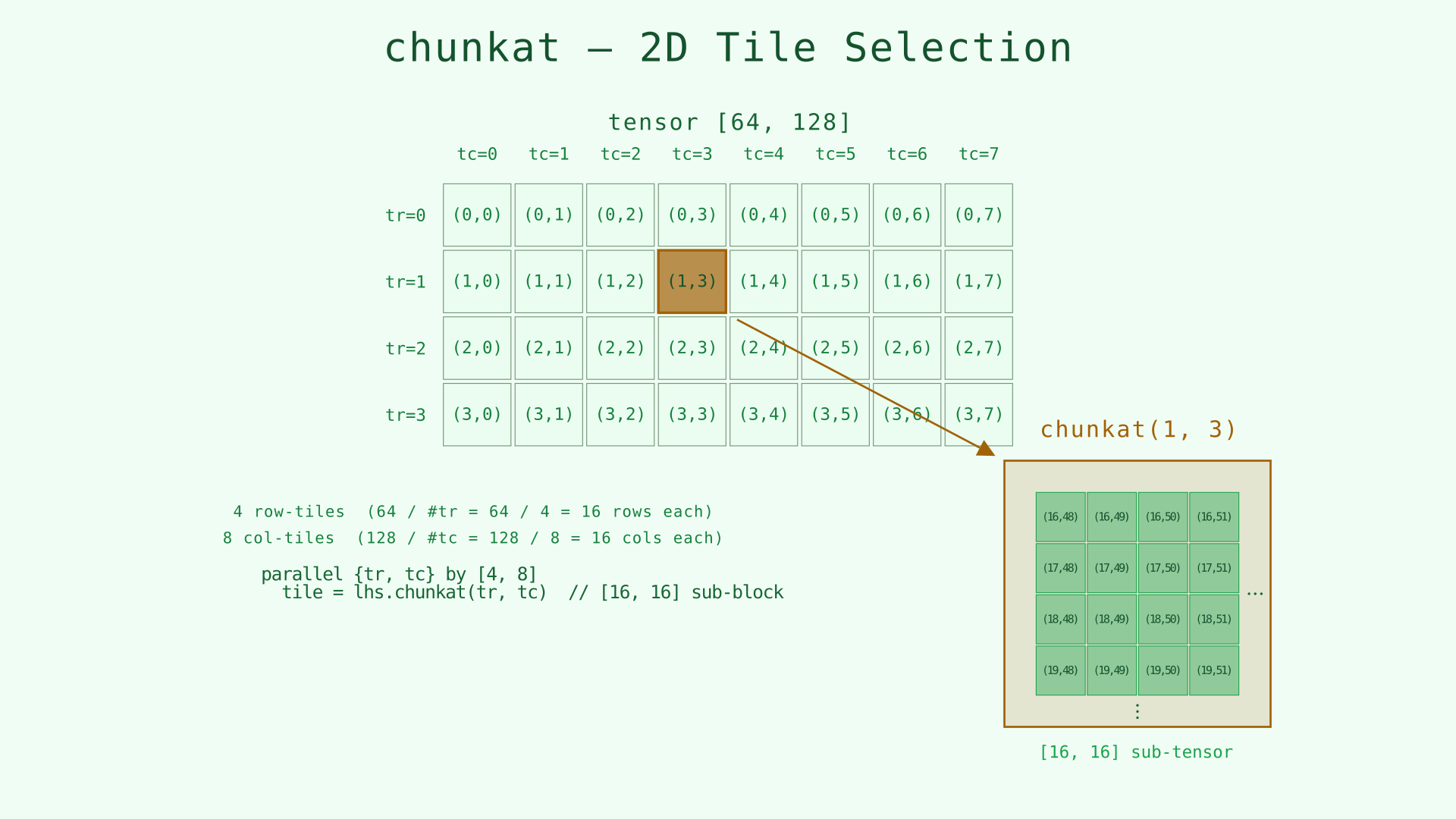
chunkat(1, 3) selects one equal tile from a regular tiling grid.
Animated version
subspan(...).at(...): explicit tile extents on a tile grid
lhs.subspan(64, 64).at(block_m, iv_k)subspan says what the tile shape is. .at(...) says which tile instance you want. This is the better fit when the tile shape is an explicit algorithmic choice, such as a GEMM tile of [64, 64], rather than something you want inferred from parallel by ....
view(...).from(...): explicit tile extents with explicit element offsets
lhs.view(TILE_M, TILE_K).from(offset_m, offset_k)view(...).from(...) is the most general selection form introduced in this chapter. view(...) states the shape of the region you want, and .from(...) gives its starting coordinate in element space.
This is the right tool when the tile origin is already available as element offsets rather than tile indices, or when the region is not most naturally described as an equal chunk. It is especially useful for dynamic and irregular access patterns where chunkat(...) would be awkward or impossible.
You can think of the three forms like this:
- Use
chunkat(...)when the surrounding parallel decomposition already defines an equal tiling. - Use
subspan(...).at(...)when you want an explicit tile shape and tile coordinates. - Use
view(...).from(...)when you want an explicit tile shape and element-space starting offsets.
Futures, .data, and .span
The result of a DMA or TMA statement is a future-like handle:
f = dma.copy input => shared;That handle gives you two important things:
f.data: the moved tile, as a spanned tensor.f.span: the shape of that tile.
Example:
f = dma.copy input => shared;
foreach idx in [f.span]
  output.at(idx) = f.data.at(idx);
Even synchronous copies are worth naming when you want to pass the moved tile to later code.
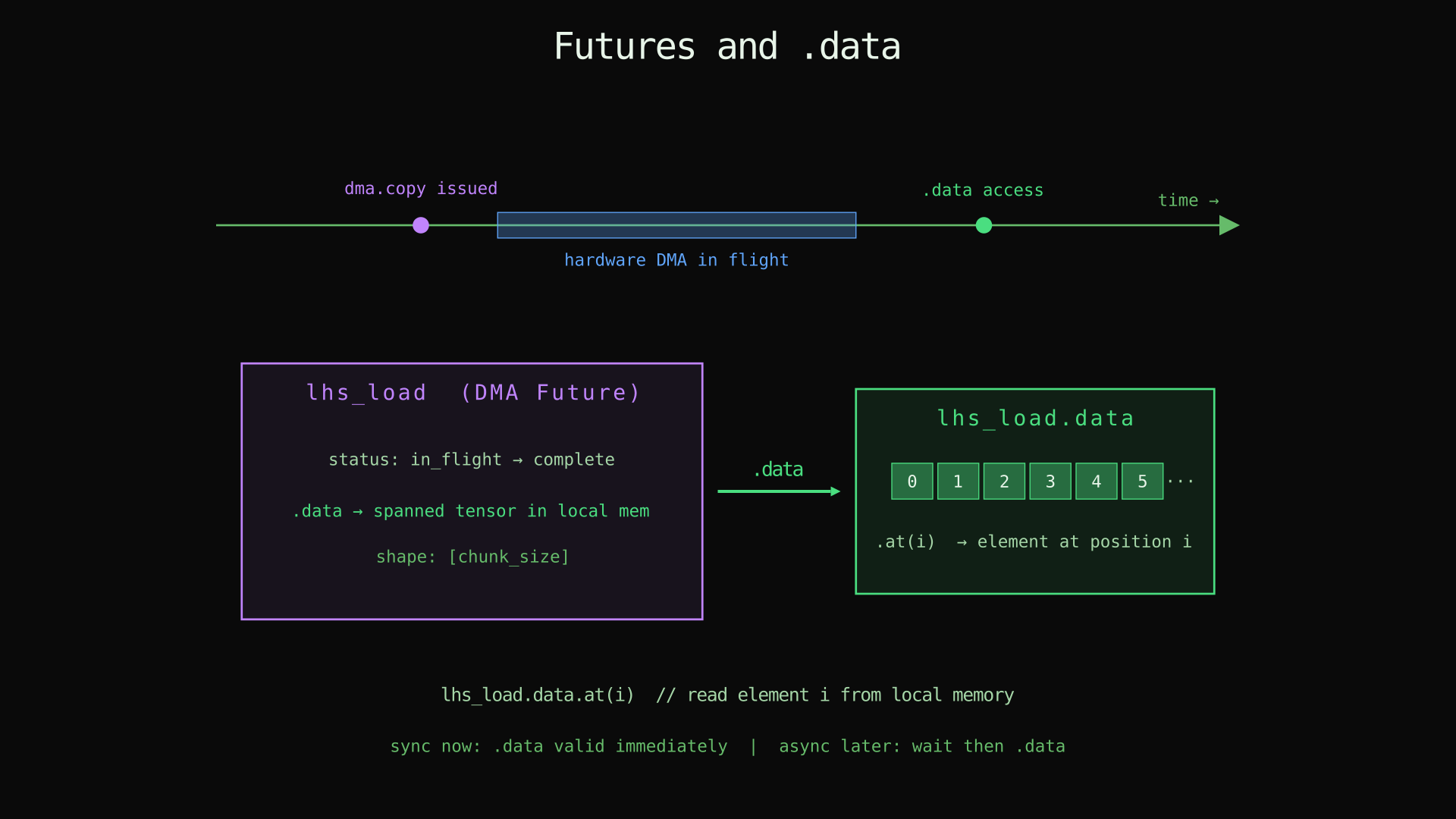
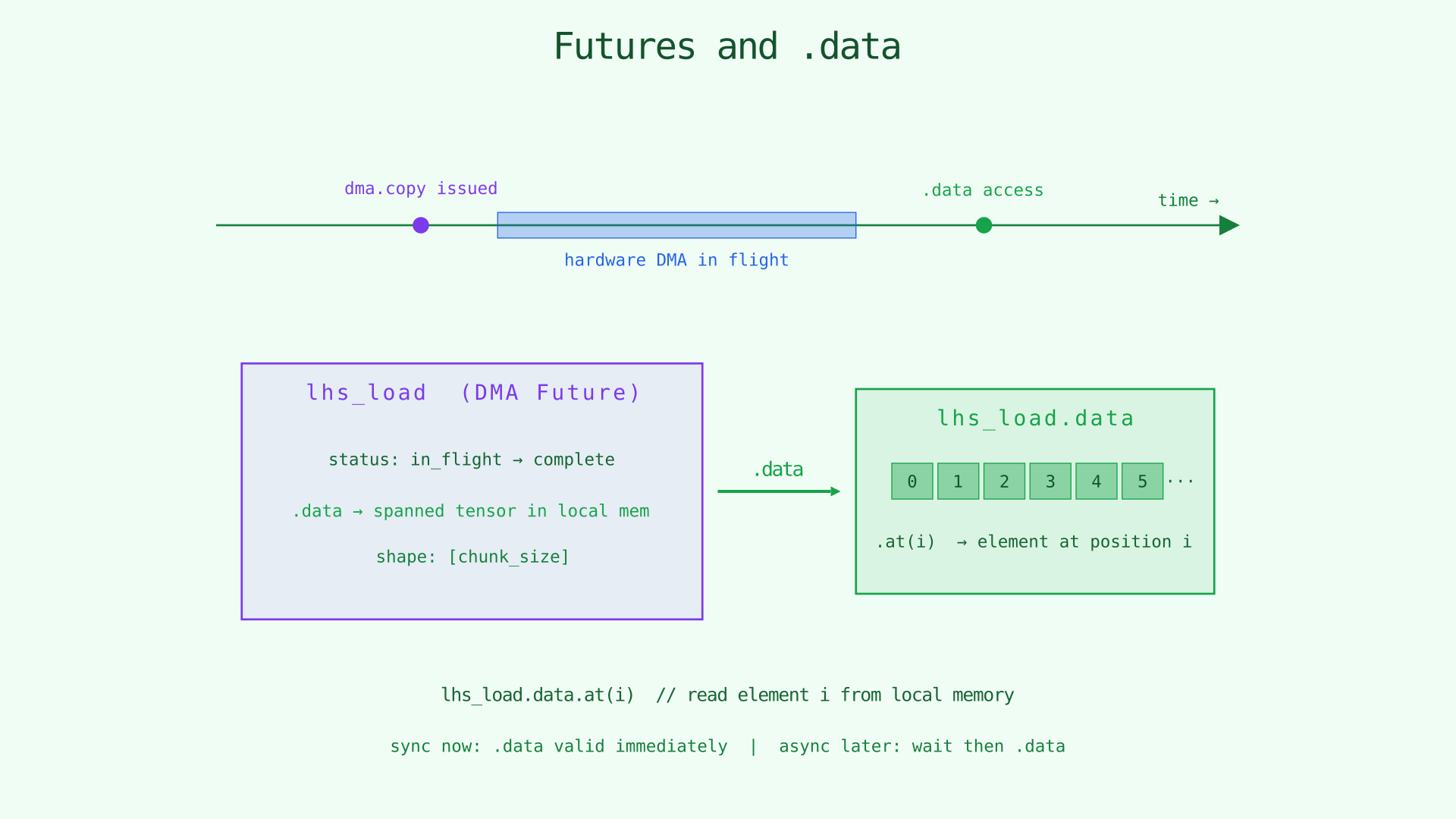
The transfer result is a handle. Read the copied tile through .data and its shape through .span.
Synchronous and Asynchronous Copies
By default, copies are synchronous:
f = dma.copy input => shared;
dma.copy f.data => output;
Add .async when you want the transfer to proceed in the background:
f = dma.copy.async input => shared;
wait f;
dma.copy f.data => output;
The same pattern applies to TMA:
f = tma.copy.async input => shared;
wait f;
tma.copy f.data => output;
Rule: if you read f.data from an async transfer, wait first.
Later chapters use async copies to overlap load and compute. In this chapter, the important part is the contract: .async creates an in-flight transfer, and wait makes it safe to consume.
Other Operations: transp and pad
copy is only the simplest member of the family.
dma.transp<...>
fa = dma.transp<1, 0, 2> a => local;
dma.copy fa.data => o;
This permutes dimensions during the movement itself. You do not first copy and then transpose. The transfer produces data in the transposed layout.
dma.pad<...>
f = dma.pad<{2, 1}, {3, 2}, {0, 0}, V>.async input => shared;
wait f;
dma.copy f.data => output;
Padding creates a larger destination tile. The template arguments describe low padding, high padding, internal stride-style padding, and the fill value. Use pad when you want explicit border values, not just out-of-bounds protection.
#: Compose and Extent
Croqtile uses # in two related ways.
Compose: outer # inner
output.at(tr # i, tc # j)This combines a tile coordinate with an in-tile coordinate to produce a coordinate in the full tensor.
Read tr # i as "row i inside tile tr."
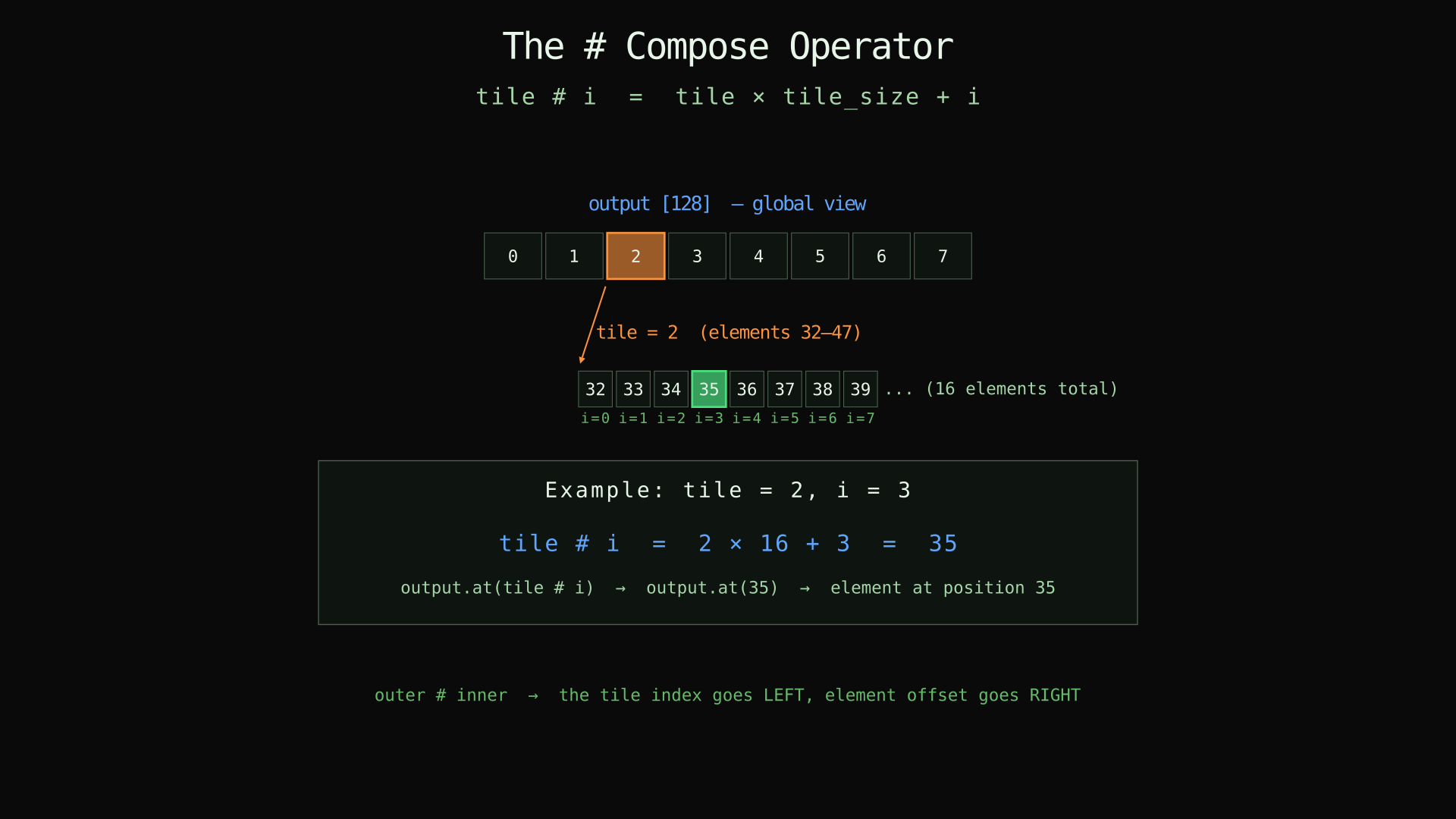
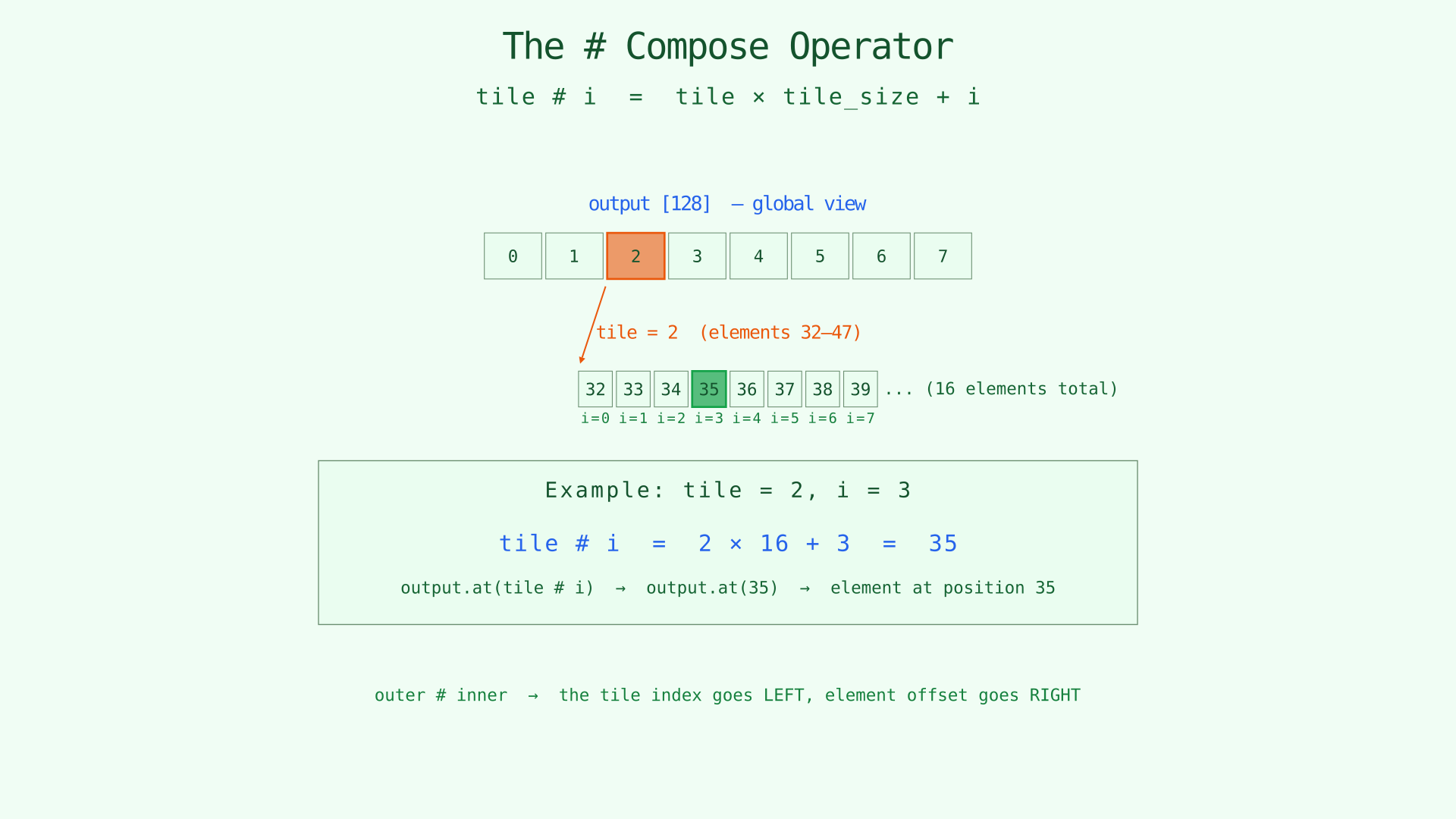
Compose a tile index with an in-tile offset to recover a global coordinate.
Extent: #name
foreach i in [128 / #tile]Here #tile means the extent of the tile axis: how many tiles exist along that dimension. If parallel tile by 8, then #tile is 8.
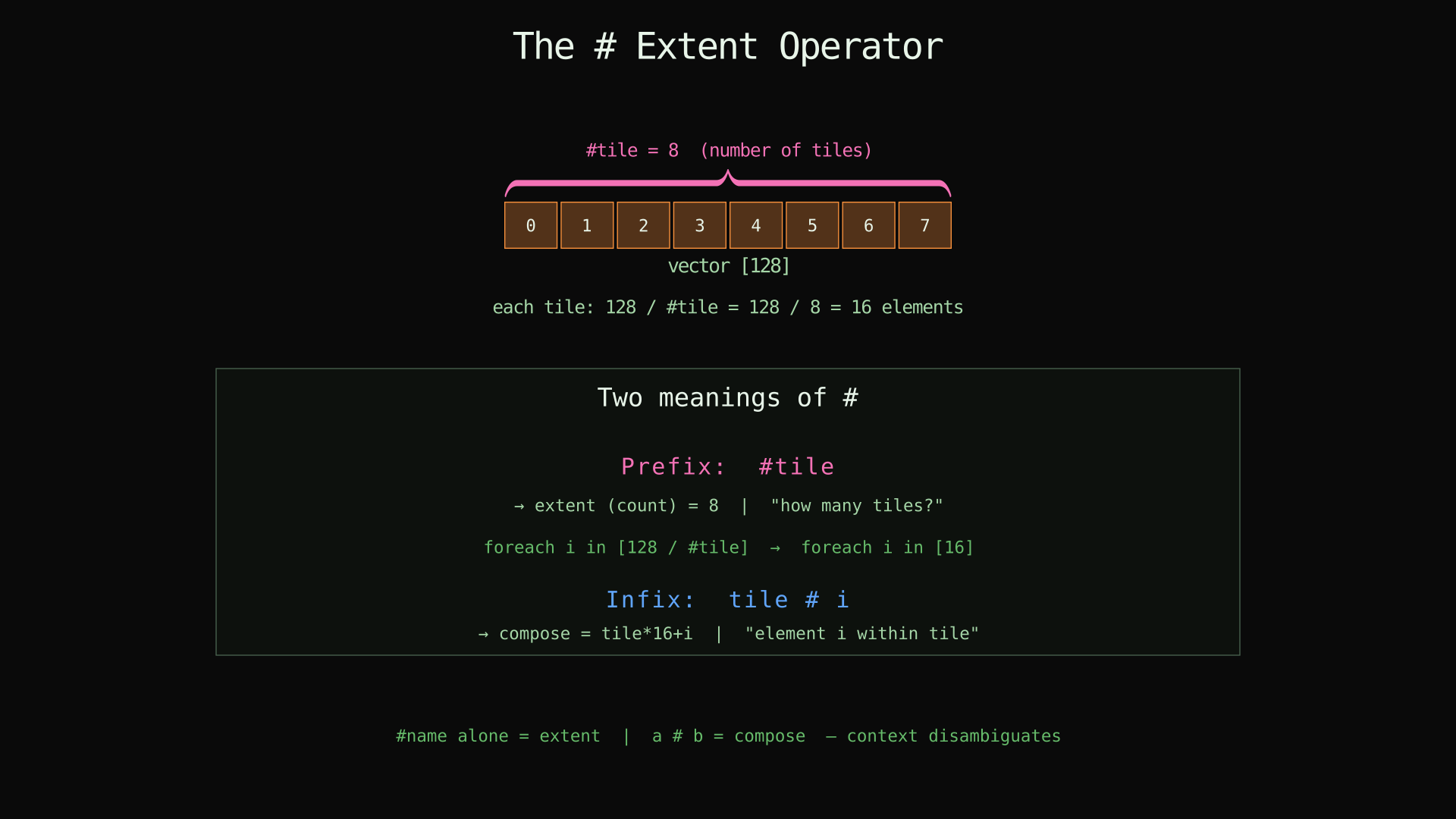
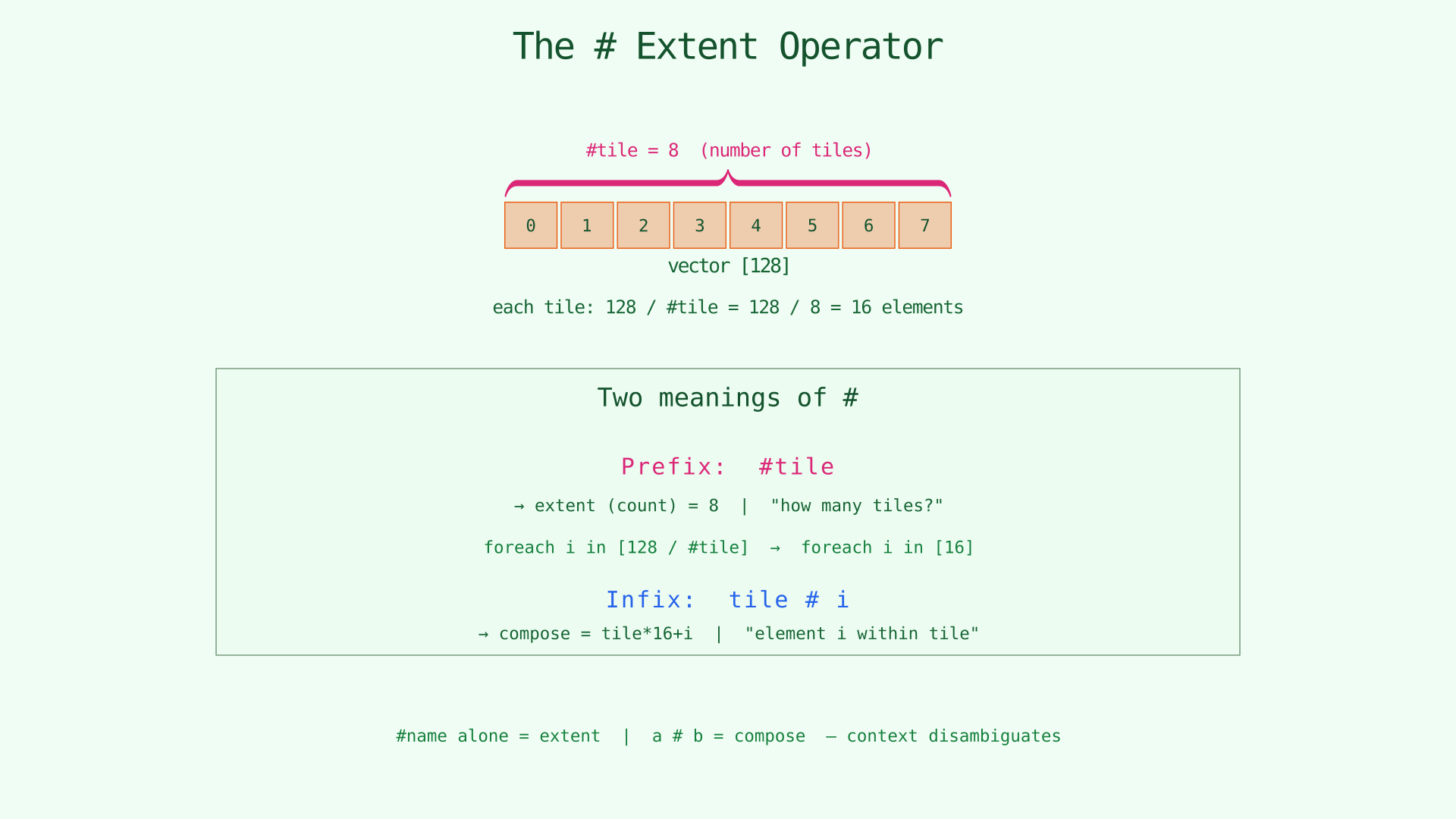
Prefix # asks for an extent. Infix # composes coordinates.
span and span(i)
tensor.span gives the full shape of a tensor. tensor.span(i) gives one dimension.
s32 [lhs.span(0), rhs.span(1)] output;This comes up constantly in data movement code because output shapes often come from different inputs, and moved tiles frequently need to preserve or recompute shape information.
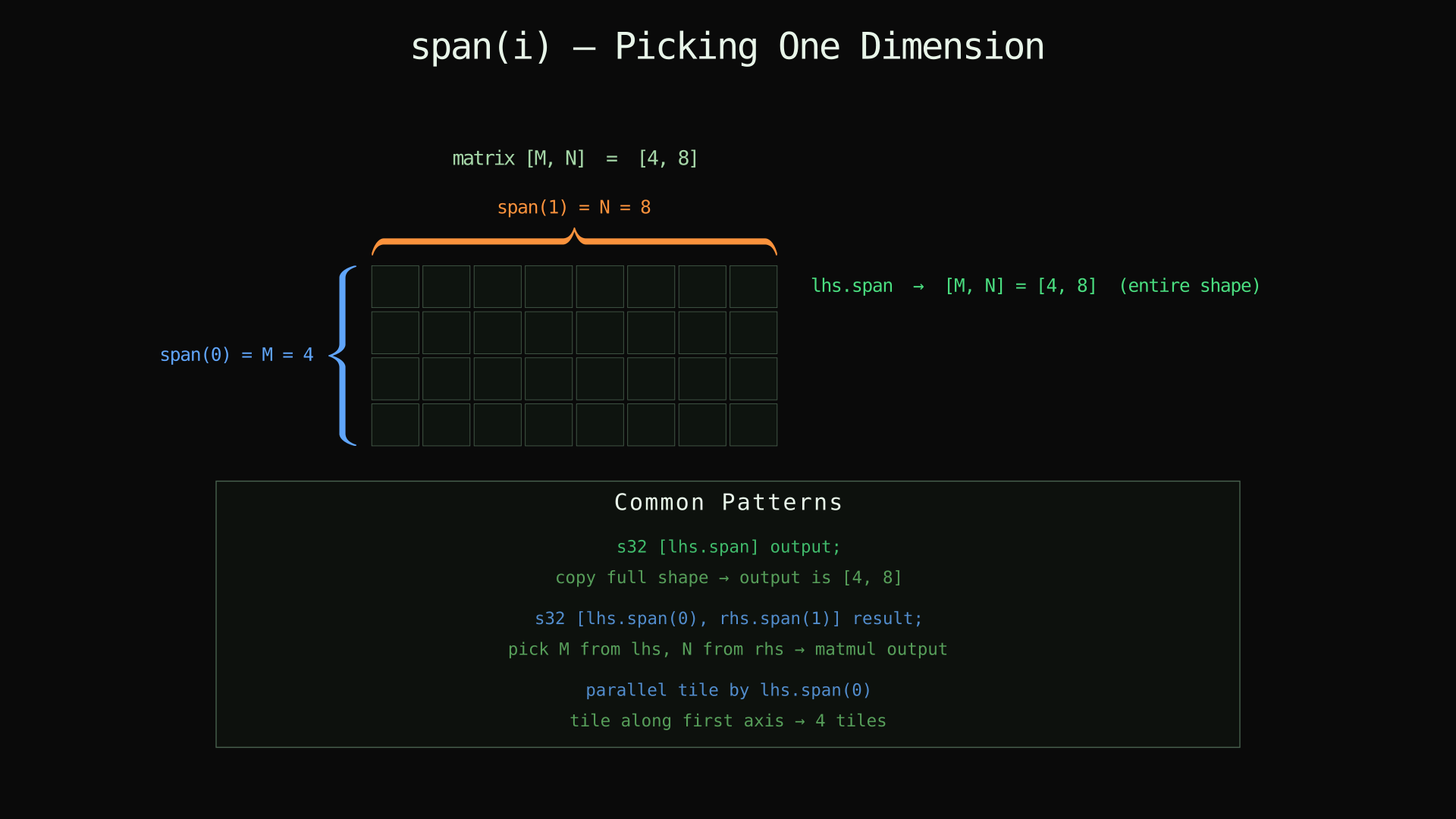
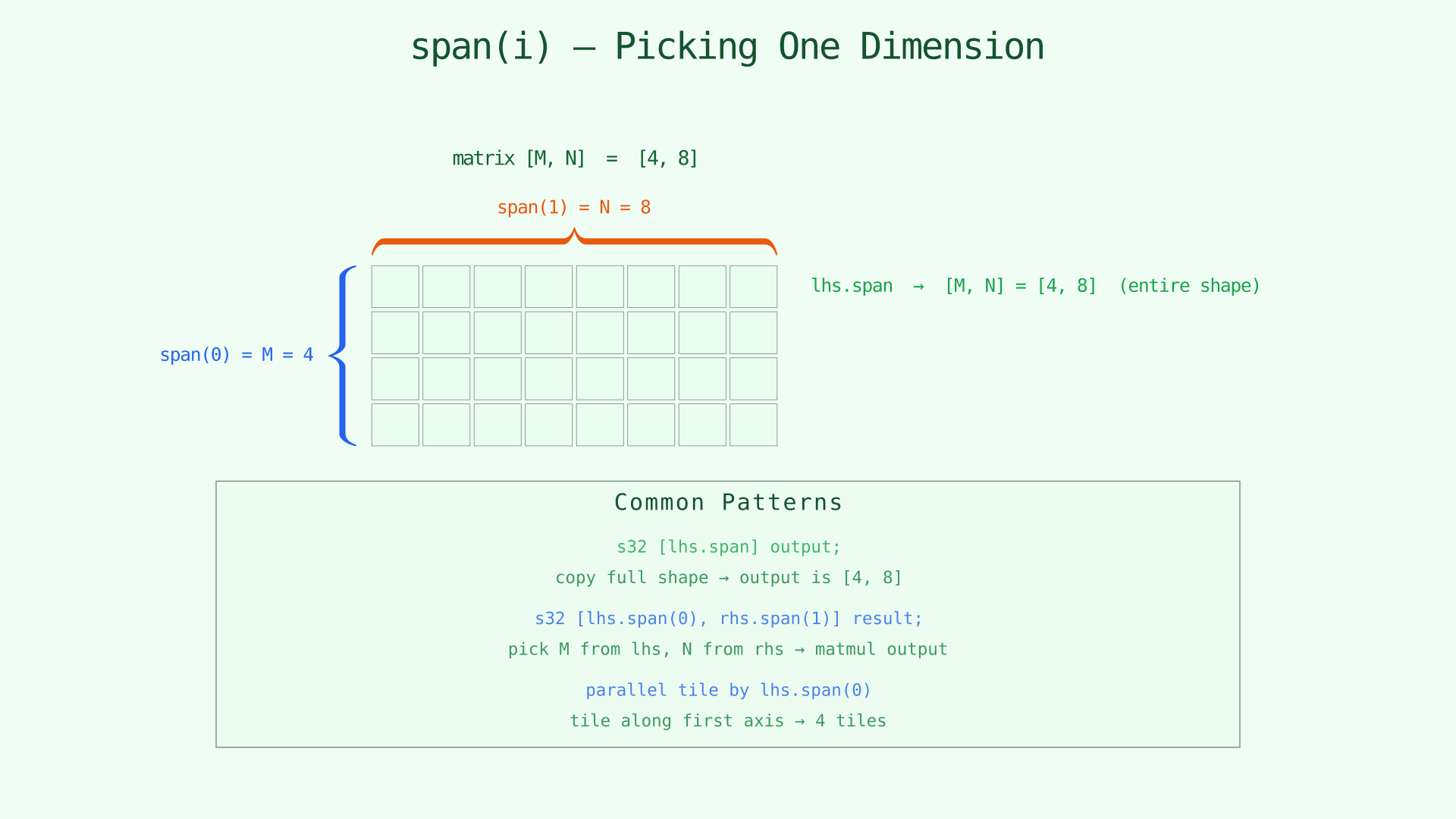
Use span for the whole shape, span(i) for a single axis.
Memory Specifiers: global, shared, and local
The destination of a movement statement also states where the moved tile should live.
global: device memory. Large, slow, visible across the device.shared: block-visible on-chip memory. This is the usual staging area for cooperative tiles.local: thread-private storage. Good for small private tiles or non-cooperative use.
f0 = dma.copy input => shared;
f1 = dma.copy matrix_tile => local;
dma.copy out_tile => output;
For performance-sensitive kernels, shared is the important level. The compiler's cooperative tiled lowering is aimed at global-to-shared and shared-to-global movement. local copies are still useful, but they are not the main fast path for cooperative block transfers.
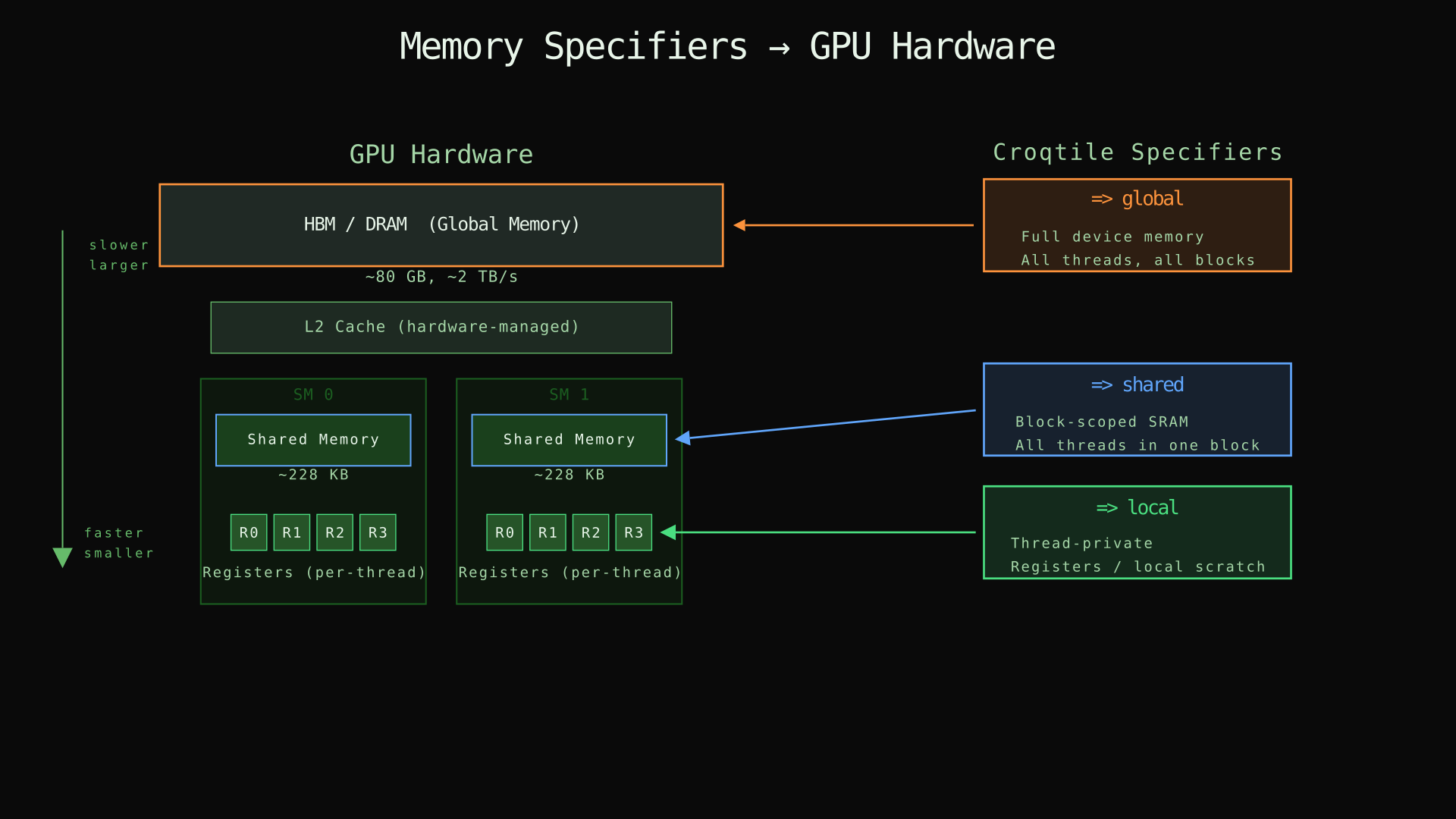
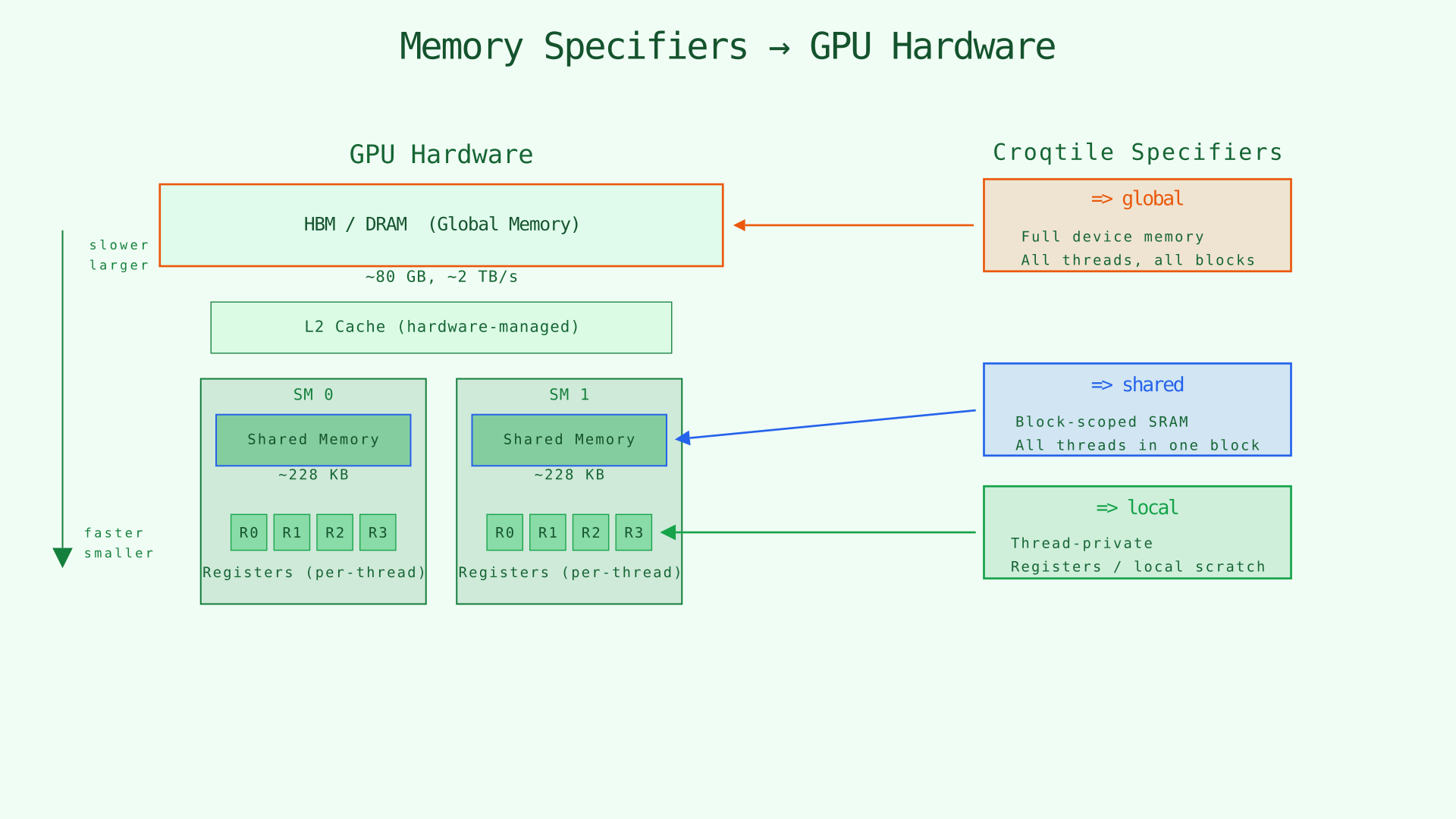
Croqtile's memory specifiers map directly onto the GPU memory hierarchy.
Partial Tiles, Guarding, and .zfill
Real kernels often end with a partial tile. The important distinction is whether the source tile shape and destination tile shape are the same.
For example:
dma.copy.swiz<32>.zfill
  lhs.view(ROWS_M, TILE_K).from(base_m, base_k)
    => lhs_load_s;
Here lhs_load_s might have shape [WARP_M, TILE_K], while the source view has shape [ROWS_M, TILE_K] and ROWS_M may be smaller than WARP_M on the last tile. That is a real shape mismatch, so .zfill means: copy the valid source rows and write zero into the remaining rows of the destination tile.
That is the right use for .zfill.
What happens when the shapes are the same:
- If the source view and destination tile have the same shape, the compiler already guards runtime tails automatically.
- In that case it generates masking so out-of-bounds elements are not read or written.
- This is enough for cases like tiling a
[100]tensor into[64]tiles: the last tile simply has 36 valid elements.
So .zfill is not the general mechanism for “any partial tile.” It is specifically for cases where the destination tile is larger than the valid source region and the extra part of the destination must be filled with zeros.
Why .zfill matters:
- If the consumer reads only the valid region, the compiler's automatic masking is usually enough.
- If the consumer reads the whole destination tile, especially an MMA fragment, the invalid region must hold a known value.
.zfillmakes that extra region zero.
Use .zfill when the valid source region is smaller than the destination tile and the consumer will treat the destination as a full dense tile. This is the common case for GEMM-style pipelines with dynamic row counts or padded edge tiles.
If you add .zfill when the source and destination shapes are already the same, the compiler can warn that the .zfill is redundant. Conversely, when the shapes differ, the compiler can also warn that .zfill is needed to avoid using undefined values in the uncovered region.
.swiz<N>: Shared-Memory Layout for the Consumer
Swizzle is mainly about how the tile should live in shared memory so later operations can read it efficiently.
Typical GEMM staging code looks like this:
dma.copy.swiz<128> lhs.subspan(WARP_M, TILE_K).at(block_m, iv_k) => lhs_load_s;
ma = mma.load.swiz<128> lhs_load_s.chunkat(_, iv_warp);
The load-side and compute-side swizzles need to agree. If you stage a tile with .swiz<128>, the consumer should usually load it with the matching swizzle.
This chapter only introduces the idea. The MMA chapters go deeper into which swizzle values pair well with which matrix layouts.
DMA vs TMA
Both engines move shaped tiles. The difference is how they do it and what constraints they require.
dma |
tma |
|
|---|---|---|
| Implementation | Cooperative software copy | Hopper Tensor Memory Accelerator |
| Hardware requirement | General GPU path | SM90+ |
| Good fit | Dynamic or irregular tiles, portable code | Fixed-shape high-bandwidth staging |
| Common destination | shared |
shared |
| Async support | Yes | Yes |
Example TMA use:
f = tma.copy.async lhs.subspan(64, 64).at(block_m, iv_k) => shared;
wait f;
The practical rule is simple:
- Use
dmawhen tile sizes are dynamic, irregular, or you want the portable path. - Use
tmaon Hopper when the tile shape is fixed and you want hardware-assisted movement.
The main TMA constraint
TMA tile shapes must be host-computable. Runtime tile indices are fine:
tma.copy lhs.subspan(64, 64).at(block_m, iv_k) => shared;But a kernel-runtime value cannot define the tile shape itself:
// Not valid for TMA if TILE_M is only known inside the kernel
tma.copy lhs.subspan(TILE_M, 64).at(block_m, iv_k) => shared;
If the tile size truly depends on kernel-runtime state, use dma.copy instead.
Writing DMA and TMA That Lower Well
You do not need to know the whole lowering pass to write good code, but a few rules matter.
For high-throughput DMA
- Prefer
global <-> sharedmovement for cooperative staging. - Use enough participating threads. A warp-sized or larger cooperative group is the common case.
- Keep source and destination ranks aligned.
- Use ordinary byte-sized or larger element types.
- Reserve
localfor private tiles, not as the default performance path.
If these conditions do not hold, the compiler can still generate a correct copy, but it may fall back to a simpler path.
For TMA
- Use it on SM90+.
- Keep the tile shape fixed from the host's point of view.
- Stage into shared memory.
- Add
.zfillfor partial tiles that feed full-tile consumers.
Checklist
By the end of this chapter, the new pieces of syntax should mean the following:
| Syntax | Meaning |
|---|---|
dma.copy src => shared |
Move a tile into shared memory. |
tma.copy src => shared |
Use Hopper TMA to move a tile into shared memory. |
dma.copy.async ... |
Start a non-blocking DMA transfer. |
wait f |
Wait until future f is ready to consume. |
future.data |
Access the moved tile. |
future.span |
Access the moved tile's shape. |
dma.transp<...> |
Permute dimensions during transfer. |
dma.pad<...> |
Pad during transfer with an explicit fill value. |
.zfill |
Zero-fill out-of-bounds positions in partial tiles. |
.swiz<N> |
Choose a shared-memory swizzle layout. |
chunkat(...) |
Select one equal tile from a regular tiling. |
subspan(...).at(...) |
Select a tile by explicit tile extents and tile coordinates. |
view(...).from(...) |
Select a tile by explicit extents and explicit element offsets. |
tile # i |
Compose tile and in-tile coordinates into a global coordinate. |
#tile |
Ask for the extent of the tile axis. |
The next chapter builds on this by overlapping movement with compute. Once you can think of a kernel as a loop that repeatedly stages tiles and computes on staged tiles, double buffering and pipelining become natural extensions rather than new ideas.